

We all seek for music that perfectly fits our mood, whether it’s an energizing soundtrack for a gym session or a relaxing vibe after work. What if there were a playlist that magically adapted to your daily routine? That is what Spotify daylist offers, a dynamic playlist updating throughout the day to match every version of you.
Launched in September 2023, Spotify daylist has quickly gained popularity. In this guide, we’ll explore Spotify daylist, showing you how to find, save, share, and even download it. Discover how this unique feature helps express your audio identity and offers insights into your musical preferences.

Spotify daylist is a personalized playlist that updates throughout the day to match your evolving moods and activities. It is available for both Premium and Free users.
By analyzing your listening habits at different times of day and specific days of the week, this dynamic playlist tailors the song selection according to your musical preferences. The goal is to provide a fresh and personalized soundtrack for every moment.
Typically, each daylist contains 50 songs and refreshes several times a day—through early morning, morning, afternoon, evening, night, and even late night. With each update, you’ll find new tracks, fresh color schemes, and a unique title that sets the mood, such as “Happy Dance Punchy Late Night” or “Dopamine Holiday Morning.” Check if they resonate with your mood at that time or your unique audio identity!
Additionally, you can see the “Next update” time displayed under the daylist name to know exactly when your playlist will refresh.

Spotify daylist feature is available for both Free and Premium Spotify users. You can find it through the Spotify app and web player. Here are three ways to get your daylist on Spotify. After finding your daylist, add it to your Library for easy access at any time.
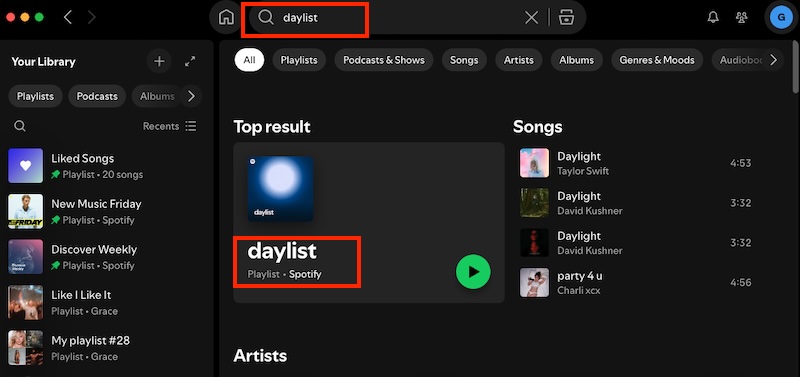

For even faster access to Spotify daylist, simply head to spotify.com/daylist in your web browser. This will take you directly to your daylist. Log into your Spotify account if needed.
Add the daylist to your Library to easily find it later. Simply tap the Add to Library button (the plus icon) under the playlist name. This method works on both mobile and desktop.

While daylist updates regularly, you may need to save specific versions that resonate with you. Otherwise, the playlist will be filled with new songs after the next update. Here’s how to save daylist as a separate playlist on your phone or computer before it’s gone.

If your daylist perfectly fits your musical mood, share it with your friend and let them experience what moves you.
You can share the link of your daylists. In addition, Spotify allows you to create daylist sharecards for easy sharing on social media platforms.
Note: If you don’t see the Download option, go to the app store and update your Spotify app.

These visually appealing Daylist Sharecards come in three unique styles:

On your computer, you can share daylist from the web player or desktop app:

While Spotify offers an offline listening feature, it’s exclusive to Premium subscribers. This means free users can’t directly download their daylist for offline enjoyment. Fortunately, the limitation can be overcome with Pazu Spotify Converter, an intelligent tool that supports both Spotify Free and Premium users.
Pazu Spotify Converter enables Free and Premium users to download Spotify songs, playlists, albums, or podcasts for offline listening. It extracts Spotify music and converts it to various high-quality formats, including MP3, M4A, AIFF, WAV, FLAC, and AAC. Pazu Spotify Converter is compatible with both Windows and Mac computers. After downloading, you can transfer the songs to any other compatible devices for offline enjoyment. With this tool, you gain full control over your music collection and can play it on any supported device.
Now, let’s learn how to use Pazu Spotify Music Converter to download Spotify songs with a free subscription.
Download, install, and run Pazu Spotify Converter on your Mac or Windows. After logging in to your Spotify account, use the integrated Spotify web player to search for your daylist playlist. Click the Add to List button to load all songs.

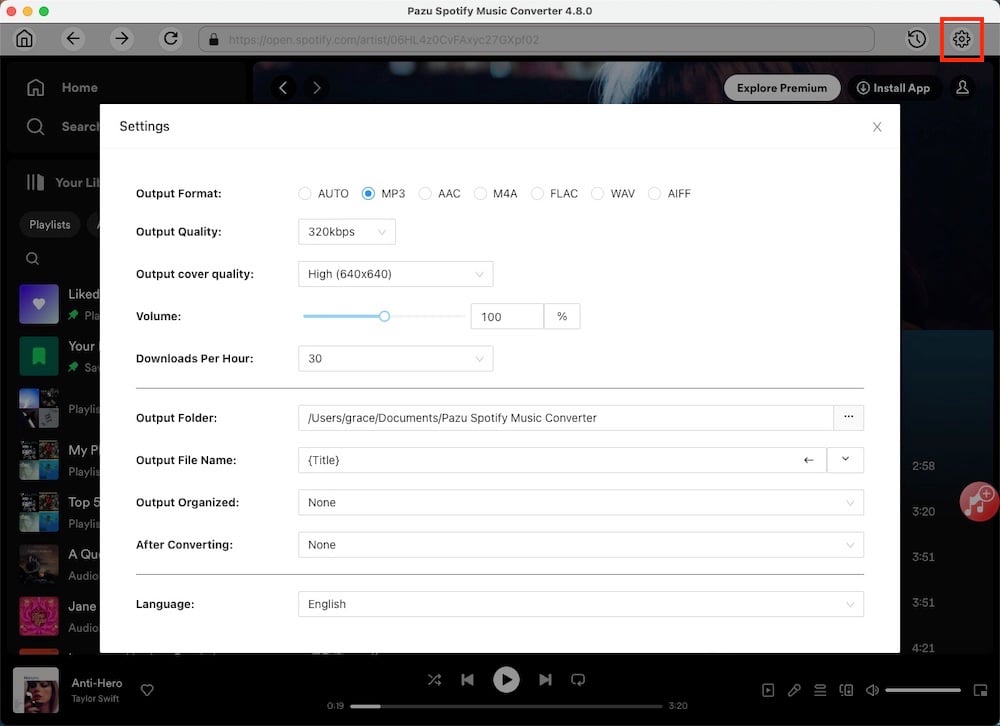
Click the Gear icon on the top right corner to select the output format (AUTO[M4A], MP3, AAC, FLAC, WAV, or AIFF), choose output audio quality, customize the output folder, and more.
Click the Convert button to start downloading the Spotify songs to your local computer.
To download individual songs or specific songs of your choice, simply uncheck the ones you don’t want to download and click the Convert button.

Once the conversion is done, click the Folder button or directly go to the output folder you customized in the previous step to find the downloaded Spotify songs. From there, you can transfer the songs to any compatible device and enjoy them offline.

Note: The free trial version of Pazu Spotify Converter enables you to convert the first three minutes of each song. You can remove the trial limitation by purchasing the full version.
Spotify daylist is more than just a playlist – it’s a dynamic reflection of your musical identity throughout the day. Explore your daylist and share your musical journey. If you want to preserve those perfect musical moments, Pazu Spotify Converter offers a solution by enabling you to download your daylists to MP3 format.

Download and convert any Spotify songs, albums, playlists to MP3/M4A etc.