

Listening History is a convenient feature that helps you find a song name when you forget it, continue listening from where you left off, and keep track of your listening preferences. Amazon Music offers this feature in its “Recently Played” and “Song History” sections. The platform also allows you to remove recently played playlists or albums and delete songs from the listening history.
In this article, we will guide you on how to find your Amazon Music listening history on mobile and desktop devices, as well as how to clear your recently played.

Typically, music streaming platforms track your listening history to provide personalized recommendations. They also allow users to check and edit their listening history. However, the listening history feature can be given different names on various platforms. For Amazon Music, this feature is displayed as both “Recently Played” and “Song History”.

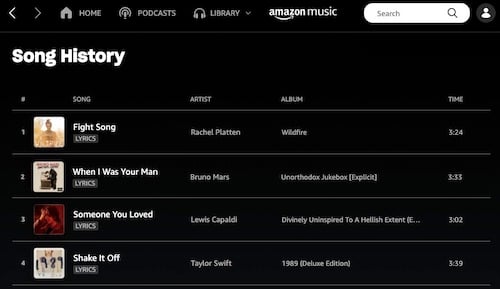
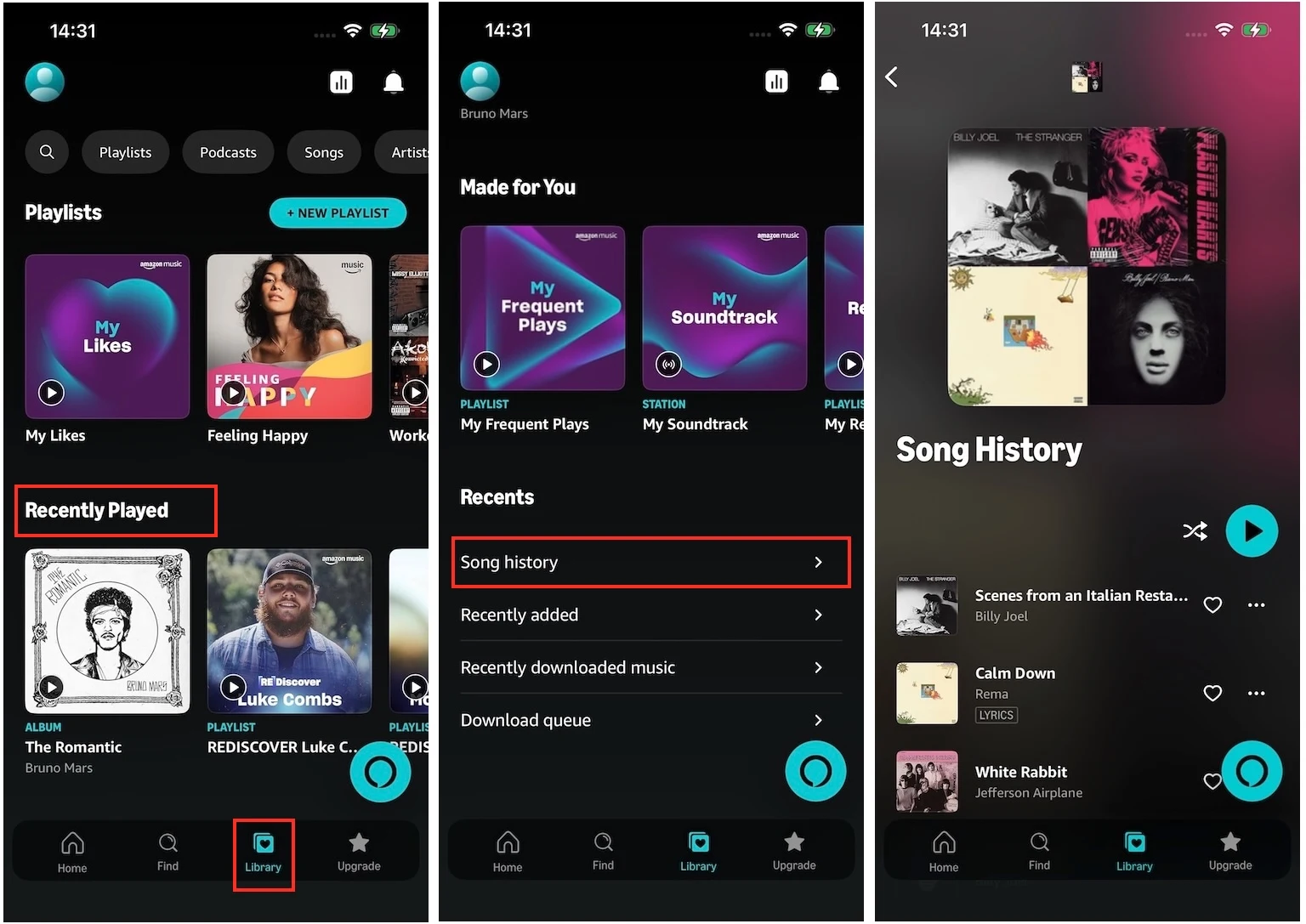
To view your Recently Played and song history list on your iOS/Android devices, follow these steps:
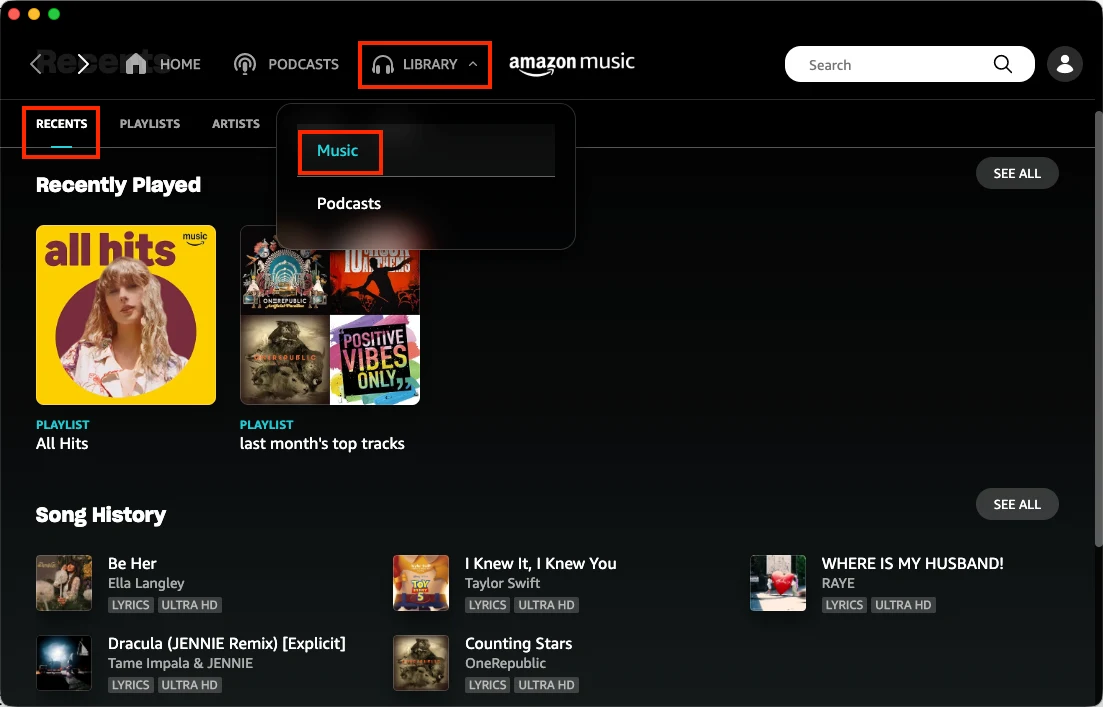
You can find both the Recently Played and Song History from the Amazon Music app on your Mac or Windows:
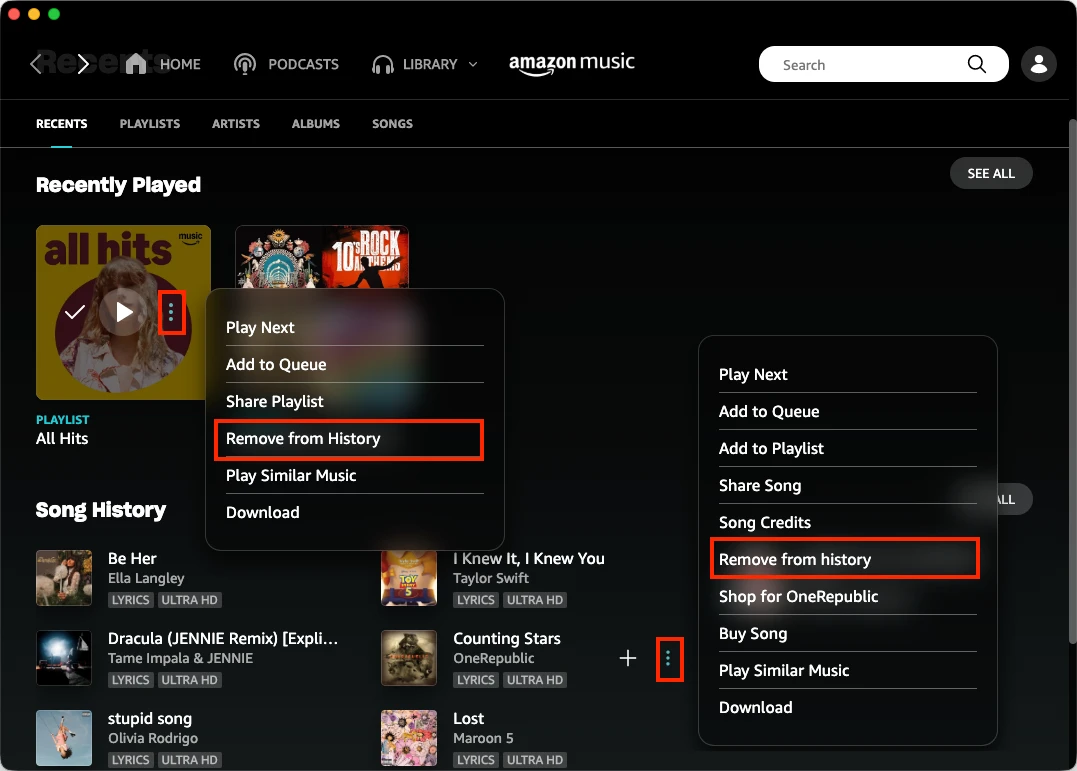
To edit the listening history, the best option is the Amazon Music app on your desktop. The Amazon Music app on Mac or Windows allows you not only to remove playlists or albums from your Recently Played but also to delete individual songs from the Song History.
The Amazon Music web player and the Amazon Music app can only view your Recently Played and song history, but cannot edit them.
Amazon Music Unlimited members can download songs, albums, and playlists for offline playback, but Amazon Music Prime members can only download All-Access Playlists. Furthermore, the downloaded content is protected by DRM. This means they can only be played within the Amazon Music app and cannot be transferred to other devices.
If you want to save Amazon Music Recently Played and play them on other devices, you can use a professional Amazon Music Downloader – Pazu Amazon Music Converter. The tool allows you to download any songs, albums, and playlists from Amazon Music Prime/Unlimited to MP3, M4A, AAC, FLAC, WAV, and AIFF. This way, you can listen to your favorite songs anywhere and play them on any compatible device. Moreover, the audio quality and original ID3 tags of the downloaded MP3 files are preserved.
Amazon Music Free doesn’t support offline playback. However, with Pazu Amazon Music Converter, you can also download songs, playlists, and albums to MP3 with Amazon Music Free.
Now follow the tutorial below to learn how to convert Amazon Music to MP3 with a few steps.
Download, install, and launch Pazu Amazon Music Converter on your computer, then click Sign In to log in to your Amazon account.
If you have purchased a license, click the key icon to register the converter. If not, continue using the trial version.

Click the Settings icon in the top-right corner and select MP3 as the output format.

Select the desired songs, albums, or playlists you wish to download. Once you open an album/playlist and tap the red Add button suspended on the right side, you’ll be presented with the list of songs.

All songs in the playlist will be added by default. Click the check box next to the track that you don’t want to convert.

Click the Convert button in the bottom-right corner, and Pazu Amazon Music Converter will automatically download and convert Amazon Music tracks to the default folder on your computer.

When the conversion process finishes, you can browse all the converted songs in the history list by clicking on the  icon. And now you’re prepared to stream your Amazon Music songs anywhere.

MP3 songs downloaded with Pazu Amazon Music Converter are tagged correctly. MP3 players read artists, songs, and other information from the ID3 tag that is embedded in the MP3 file.
It is straightforward to check your Amazon Music history on your mobile and desktop devices. To clear the listening history, the best way is to use the Amazon Music desktop app. If you want to download your recently played songs and playlists to MP3, use the Pazu Amazon Music Converter. It allows you to download any songs, albums, and playlists from Amazon Music to MP3 and other popular formats, even with a free account.
Download and install Pazu Amazon Music Converter on your computer to get started.

Download Amazon Music to MP3, FLAC, etc.