

Apple Music and Amazon Music are two of the most popular music streaming services. Both offer over 100 million songs and are available on most devices. Here is a detailed comparison between these two platforms to help you choose.
| Apple Music | Amazon Music | |
| Plans | – Individual: $10.99/month – Family: $16.99/month – Student: $5.99/month | – Free: Free – Prime: Included in Amazon Prime, $14.99/month or $139/year – Unlimited: $11.99/month or $119/year for Prime members, $12.99/month for Non-Prime customers – Family: $21.99/month or $219/year (Prime members only) – Student: $5.99/month – Single Device: $5.99/month |
| Catalog | 100 million | – Free: Thousands of stations and playlists – Prime: 100 million – Unlimited: 100 million |
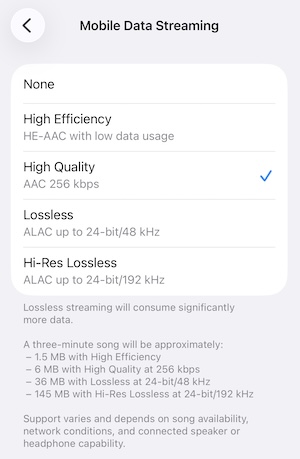
| Quality | Full catalog in lossless audio, Spatial audio with Dolby Atmos – Hi-Res Lossless: up to 24-bit/192 kHz ALAC – Lossless: up to 24-bit/48 kHz ALAC – High: up to 256 Kbps AAC – High Efficiency: up to 128 Kbps AAC | Unlimited: 100 million songs in High Definition (HD) and millions of songs in Ultra High Definition (Ultra HD) – Ultra HD: 24-bit/192 kHz (better than CD quality). – Lossless HD: 16-bit/44.1 kHz (CD quality). – Standard Definition (SD): Compressed, lossy audio. |
| Free trial | 1 month | 30 days |
Apple Music
Apple Music includes over 100 million songs. It doesn’t offer an ad-supported free version. Users need to subscribe to the service to listen to songs, but it offers a one-month free trial. You can also get 3 months of Apple Music free with eligible audio devices. With the subscription, Apple Music allows users to download tracks to play offline. The full catalog is in lossless audio now, and some songs are available in Dolby Atmos.
Amazon Music
Amazon Music lets you listen for free, but you can only access top playlists, and songs are played in shuffle. Amazon Music Prime is included in your Amazon Prime membership. It offers ad-free listening to millions of songs and podcasts, but most are played in shuffle mode except All-Access Playlists.
For full features, including higher quality, unlimited, and offline listening of any music, you’ll need to upgrade to Amazon Music Unlimited. You can usually get one-month free trial when signing up for Amazon Unlimited. But from time to time, Amazon Music offers three-month free trials.
Apple Music
Apple Music doesn’t have a free option. You need to subscribe to one of its plans to enjoy the service.
The individual plan costs $10.99/month, Family plan at $16.99/month, and Student plan at $5.99/month. All subscribers can enjoy Hi-Res Lossless up to 24-bit/192 kHz on supported devices, offline listening, and other benefits. Apple Music Family plan allows altogether six members to enjoy the service, and the Student plan includes access to Apple TV at no extra cost.
Amazon Music
Amazon Music’s plans include: Free, Amazon Music Prime, Amazon Music Unlimited, Unlimited Family, Student and Single Device plan.
Unlike Spotify, Amazon Music’s completely free option doesn’t let you listen to specific songs on demand. Instead, it offers an experience more like streaming radio with ads.
Amazon Music Prime is included with your Prime membership at no additional cost. You can access the entire Amazon Music catalog with over 100 million songs, but you can only shuffle play them except for those in All-Access Playlists. Amazon Music Prime users can also download music in All-Access Playlists to listen offline.
With Amazon Music Unlimited, you get more great features and functionality. You can enjoy music quality up to Ultra HD with Dolby Atmos and 360 Reality. You can play any music on demand and download it for offline listening. Prime members can join Amazon Music Unlimited for only $11.99/month or $119/year for an annual subscription. Non-Prime customers pay $12.99/month.
Amazon Music Family plan costs $21.99/month. Prime members can also subscribe for $219/year to save money. It allows for a total of six members to enjoy the service, and each family member has an Amazon account with personalized recommendations.
For students, Amazon Music offers a discounted price of $5.99/month. Amazon Music also offers a Single Device plan at $5.99/month.
| Plans | Amazon Music Free | Amazon Music Prime | Amazon Music Unlimited | Unlimited Family | Single Device Plan | Student Plan |
| Price | Free | Included in Amazon Prime, $14.99/month or $139/year | $11.99/month or $119/year for Prime members, $12.99/month for Non-Prime customers | $21.99/month or $219/year (Prime member only) | $5.99/month | $5.99/month |
| Ad-free music | No | Yes | Yes | Yes | Yes | Yes |
| Accounts | 1 | 1 | 1 | 6 | 1 | 1 |
| Catalog | Thousands of stations and playlists | 100 million | 100 million | 100 million | 100 million | 100 million |
| CD-quality | No | No | Yes | Yes | Yes | Yes |
Apple Music
Apple Music’s whole catalog is in lossless audio at different resolutions. In Apple Music, “Lossless” refers to lossless audio up to 48kHz, and “Hi-Res Lossless” refers to lossless audio from 48kHz to 192kHz. Lossless and Hi-Res Lossless files are very large and use much more bandwidth and storage space than standard AAC files. Listen to select songs in Spatial Audio with Dolby Atmos. You can find music available in Dolby Atmos on Apple Musicʼs editorial playlists.
Songs available in Dolby Atmos have a Dolby Atmos badge in the Now Playing page. If every song on an album is available in Dolby Atmos, you’ll see the Dolby Atmos badge on the album’s detail page. Apple doesn’t tell how many songs are available in Dolby Atmos.
Amazon Music
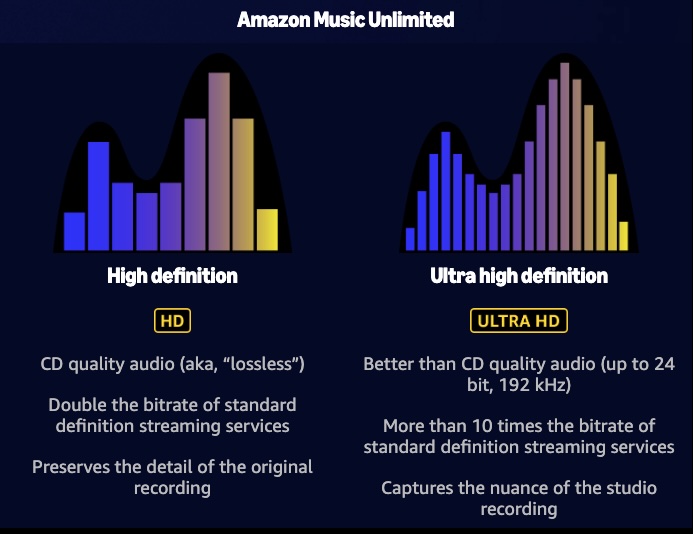
Amazon Music Unlimited offers 100 million songs in HD, millions of songs in Ultra HD and on Dolby Atmos & 360 Reality Audio.
HD, refers to CD quality audio (aka, “lossless”) about 16-bit/44.1 kHz. Preserves the detail of the original recording.
Ultra HD, Better than CD quality audio (up to 24 bit, 192 kHz). Captures the nuance of the studio recording.
Apple Music
Besides Apple Music’s 100 million songs and more than 30,000 expert-curated playlists catalog, you can also access your entire collection from Apple Music.
Tune in to live radio stations playing today’s hits, classics, and country.
Amazon Music
Besides 100 million ad-free songs, Amazon Music Prime also offers millions of podcast episodes.
If you are an Amazon Prime user, Amazon Music is a better option as you can get Amazon Music Prime at no cost. Apple Music is a better choice for the Apple ecosystem, and if you have a large music collection and want to sync it across devices, choose Apple Music.
Both Apple Music and Amazon Music allow users to download songs for offline playback. However, the downloaded songs can only be played within the app during your subscription period. Once you cancel the subscription, the downloaded content is not available.
To get songs without these limitations, it requires professional tools instead of some general music converters. Pazu Amazon Music Converter and Pazu Apple Music Converter would be your perfect choice. They are great streaming music converters that can capture songs from Amazon Music / Apple Music and convert them to several audio formats, including MP3, AAC, M4A, AIFF, WAV, or FLAC. Both of them can keep or improve the bitrate to 320 kbps for downloaded songs. With the numeral recognition technology, they can also identify and keep 100% complete metadata. You won’t lose any ID3 tags, such as artists, titles, albums, album arts, track numbers, etc. After downloading, you can play these converted songs on any device without any limitations.
Take Amazon Music as an example, here’s how to convert Amazon Music to MP3 with Pazu Amazon Music Converter. You can follow these same general steps when using Pazu Apple Music Converter.
Download, install, and launch Pazu Amazon Music Converter on your computer, then click Sign In to log in to your Amazon account.

If you have purchased a license, click the key icon to register the converter. If not, continue using the trial version.
Click the Settings icon in the top right corner to configure the output audio parameters. There are six audio formats, including M4A(AUTO), MP3, AAC, FLAC, WAV, and AIFF, for you to choose from. From there, you can change the bitrate for MP3 and AAC outputs.

Select the desired songs, albums or playlists you wish to download. Once you open an album/playlist and tap the red Add button suspended on the right side, you’ll be presented with the list of songs.

All songs in the playlist will be added by default. Click the check box next to the track that you don’t want to convert.

Click the Convert button in the bottom right corner, and Pazu Amazon Music Converter will automatically download and convert Amazon Music tracks to the default folder on your computer.

When the conversion process finishes, you can browse all the converted songs in the history list by clicking on the  icon. And now you’re prepared to stream your Amazon Music songs anywhere.


Download Amazon Music to MP3, FLAC, etc.