
Spotify is the one of the most popular music streaming service in the world with millions of playlists created by Spotify, by artists and other listeners worldwide. Premium users can download playlists to supported device and listen to them anywhere, even without Wi-Fi or data signal.
However, downloaded Spotify playlists are DRM protected and can only be played within Spotify app. To play Spotify playlists more freely, the best option is to download Spotify playlists to MP3. Here we will shows you 3 tools for you to download Spotify playlists to MP3 on Mac, Windows, Android and iOS.
Contents
Las canciones descargadas de Spotify están protegidas por DRM y solo puedes reproducirlas dentro de la aplicación Spotify en ese dispositivo, no puedes transferirlas a ningún lado. Los usuarios gratuitos de Spotify no pueden guardar canciones en sus dispositivos para reproducirlas sin conexión. Si desea disfrutar de la música de Spotify en cualquier dispositivo que desee, como un reproductor MP3, la mejor manera es descargar música de Spotify a MP3.

En esta guía, veremos el proceso de descarga de canciones mp3 de Spotify.
Descargue, instale y ejecute Pazu Spotify to MP3 Downloader en su Mac o Windows. Inicie sesión en su cuenta de Spotify con el reproductor web incorporado de Spotify. Los pasos son los mismos ya sea que tenga la versión para Mac o Windows de Pazu Spotify Converter. Aquí tomaremos la versión para Mac como ejemplo.

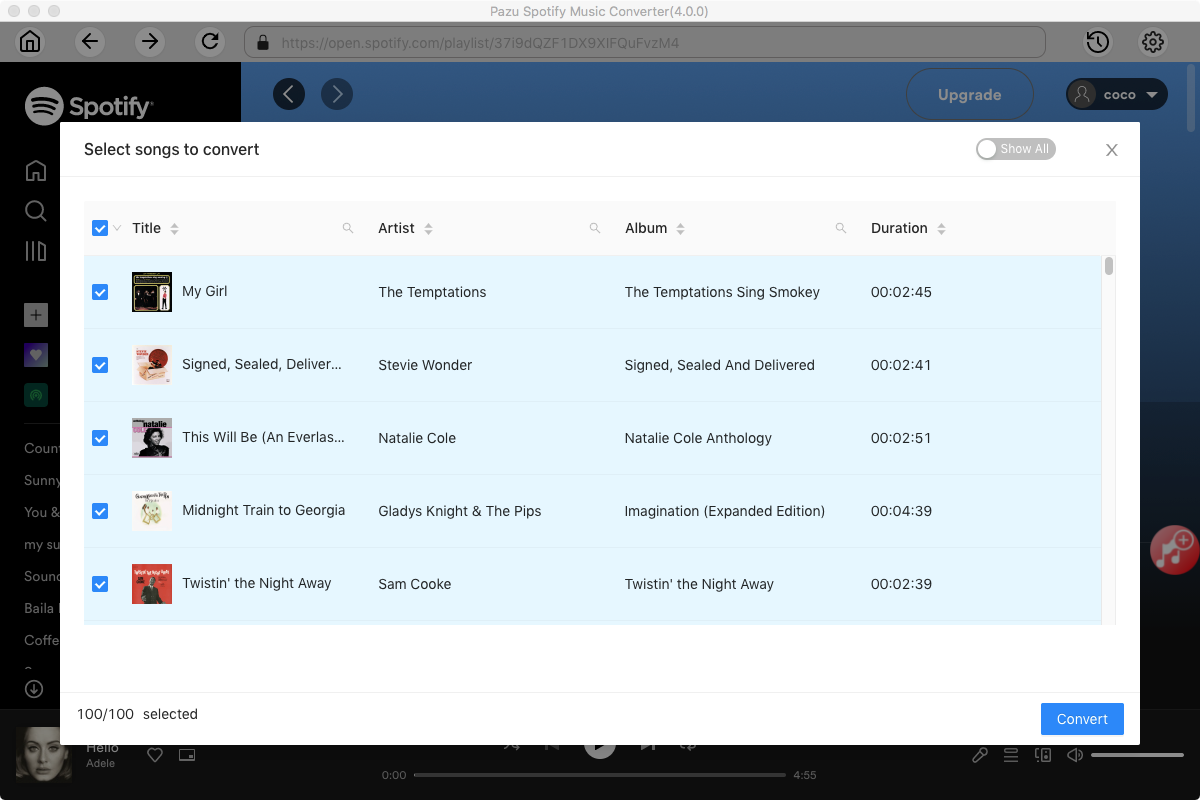
Utilice el reproductor web integrado de Spotify para buscar las canciones, álbumes, listas de reproducción o podcasts que desee descargar. Haga clic en el botón Agregar a la lista para cargar todas las canciones del álbum o lista de reproducción, desmarque las canciones que no desea descargar, si las hay.
Haga clic en el ícono de ajustes en la esquina superior derecha. Aquí puede seleccionar el formato de salida (AUTO(M4A)/MP3/AAC/FLAC/WAV/AIFF), elegir la calidad del audio de salida, personalizar la ruta de salida, organizar los archivos de salida de varias maneras, cambiar el nombre de los archivos de salida y más.

Haga clic en el botón Convertir para comenzar a descargar las canciones de Spotify a su computadora local.

Una vez realizada la conversión, puede encontrar sus canciones de Spotify descargadas como archivos locales haciendo clic en el botón de la carpeta debajo o yendo directamente a la carpeta de salida que personalizó en el paso anterior.

There are a few free online Spotify to MP3 Downloader tools that claims to allow you to download Spotify playlist to MP3, however, after our test, they only list the songs in the playlist and you need to download songs one by one. The only free online tool that allows you to download Spotify playlist to MP3 in a zip is spotify-downloader.com. However, as it actually matches and downloads Spotify playlist from YouTube, you can only get mp3 songs in 128 kbps. Besides, you may get wrong songs or nothing if the songs are not matched.
Spotify-downloader.com is a free online Spotify to MP3 converter tool that allows you to download Spotify songs, albums and playlists to MP3 without installing software. Different from other online Spotify to MP3 converter, it allows you to download all songs in a playlist to a zip file. However, you need to open Spotify web player or app to copy&paste Spotify playlist url, which is not convenient as Pazu Spotify Converter with built-in Spotify web player.
Another drawback is that it can only download Spotify to 128kbps mp3.

How to download Spotify playlist to MP3 with Spotify-downloader.com?
1. Open Spotify web player or app. Find the playlist you want to download. Click … icon - Share - Copy link to playlist.
2. Open Spotify-downloader.com in your browser. Paste above Spotify playlist link and click Submit.
3. Wait for the tool to analysis the playlist and click Download ZIP. You can scroll the slider to check if all songs are correct.
You can use above online tool to download Spotify playlist on Android directly or download them on your computer first and then transfer to Android.
Besides, there is also an Android app that allows you to download Spotify playlists to MP3 on Android. It’s called Fildo. It’s important to note that Fildo is not available on the official app stores but can be downloaded from its official website.

How to download Spotify playlist to MP3 on Android with Fildo?
Step 1. Install Fildo from the official website and launch it on your Android mobile.
Step 2. Tap More – IMPORT SPOTIFY.
Step 3. Sign in to your Spotify account, select Spotify playlists you want to import.
Step 4. Choose high matching or normal. Fildo does not host any mp3 files, it matches the Spotify songs from third party mp3 search engines.
Step 5. Once your playlists are successfully imported into Fildo, you can tap the three dots icon and start to download playlists from Spotify.
Currently there is no Spotify to MP3 converter app for iOS. Spotify hack IPA for iOS such as Spotify++ and Spotilife can't download Spotify songs. As alternative, you can download Spotify playlists to MP3 with Pazu Spotify Converer or free online Spotify to MP3 converter on Mac and then sync the songs to your iOS device.

Descargue y convierta cualquier canción, álbum, lista de reproducción de Spotify a MP3/M4A, etc.
Leer más