

The podcasting industry has experienced remarkable growth, with the number of podcast listeners reaching a staggering 619 million in 2026, up from 464.7 million in 2023. The United States stands out as the country with the highest number of podcast listeners (167 million), and about one-third of the American population listens to podcasts on a regular basis. Recent statistics show that Spotify has become the top preferred podcast application for US listeners. However, what about Apple Music? Does Apple Music offer podcasts?
Apple Music doesn’t have podcasts. While you may find random episodes of certain podcasts within Apple Music, the platform does not emphasize or provide an extensive collection of podcasts. For podcast lovers, Apple offers a separate app called Apple Podcasts for podcast lovers.
Apple used to integrate its streaming content into iTunes. However, with the introduction of macOS Catalina, Apple discontinued iTunes on newer Macs, iPhones, and iPads. This change led to the creation of individual apps for different content categories, including Apple Music and Apple Podcasts. Separating podcasts and music allows users to easily find and access the content they want. Moreover, it enables Apple to deliver more specialized features and services to the needs of podcast and music users.

Apple Podcasts is a dedicated app specifically designed for podcasts. With a vast library of recorded broadcasts, the platform offers a wide range of shows, including both globally recognized names and authentic independent productions.
According to Statista data from April 2026, Apple Podcasts holds roughly a quarter (~25%) of the U.S. platform listener share, making it one of the top choices among American podcast listeners alongside YouTube and Spotify. Furthermore, Apple Podcasts continues to account for the vast majority of server-side audio downloads, capturing an impressive 70.8% share of all global podcast downloads.
Apple Podcasts is free to use for both podcasters and listeners. Users can access millions of shows at no cost.

However, there are also premium options available for those who want to subscribe to additional content. Certain publishers offer premium shows, episodes, and channels that can be accessed through monthly or annual subscriptions. You can support many of your favorite podcasters with subscriptions.

The Apple Podcasts app comes pre-installed on all Apple devices, including Apple TV, Apple Watch, and CarPlay. Additionally, you can also listen to podcasts using iTunes on Windows or through an Alexa-enabled speaker. On Android, you can now access Apple Podcasts through its web player.
The interface of Apple Podcasts is similar to that of Apple Music, featuring familiar tabs at the bottom, such as Home (Listen Now in earlier versions), New (Browse in earlier versions), Library, and Search, on the mobile app.
To discover podcasts, you can either browse through the available options from Home (Listen Now) or use the Search function within the Apple Podcasts app. If you’re not sure what to listen to, you can explore the New (Browse) section for Top Shows and Top Episodes.
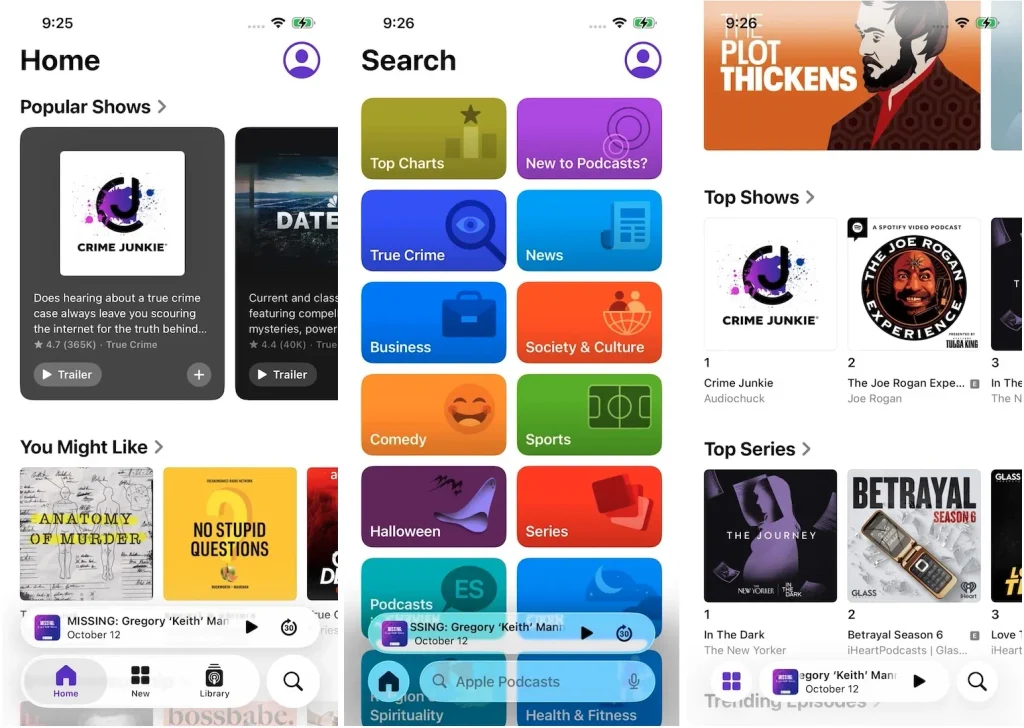
On Earlier Version of Apple Podcasts


Once you find a show you’re interested in, tap it to open its information page, then select an episode to start playing.

You can follow the show by tapping the Add button (the + button ) or Follow Show after tapping the three dots. You can also easily share it with your friends. All the shows you’ve followed can be found in your Apple Podcasts Library > Shows.

Yes, you can download any podcast episode and listen to it offline. New episodes from shows you follow will be automatically downloaded.
To download an individual episode, tap the three dots next to the episode and select Download Episode. You can find all your downloaded episodes in your Library under the Downloaded section.

To delete a downloaded episode, go to Library> Downloaded. Find the episode, tap the three dots next to it, and select Remove Download. To remove all the downloads in a show, tap the three dots in the top right corner of the downloaded show, and select Remove Downloads.

You can also choose whether to automatically delete played episodes from your device. Go to the Settings of your device, tap Podcasts, and switch on Remove Played Downloads.
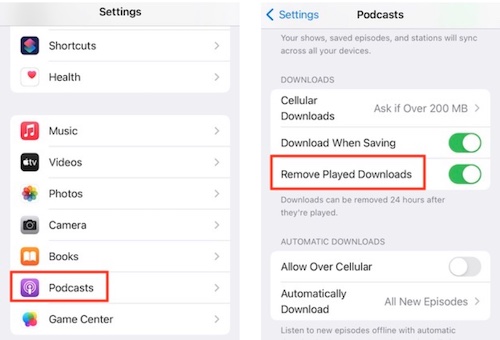
The best part is you don’t need to worry about the expiration of your downloaded content since Apple Podcasts is free to use.
It is easy to download content with Apple Podcasts. However, the situation differs when it comes to Apple Music downloads. Downloaded Apple Music content is only accessible for offline listening as long as your subscription is active and the content remains available on the service. If you decide to cancel your Apple Music subscription, the songs you downloaded during your subscription will be grayed out and no longer playable. In order to retain access to the downloaded music, you would need to reactivate Apple Music.
If you’re interested in saving your Apple Music downloads permanently on your devices, you can use a smart Apple Music downloader like Pazu Apple Music Converter. This reliable and effective tool enables you to download any Apple Music songs, albums, and playlists in formats such as MP3, AAC, FLAC, and other popular formats. With Pazu Apple Music Converter, you can enjoy your downloaded music on both Mac and Windows platforms without any loss in quality.
Not only does Pazu Apple Music Converter download your favorite songs, but it also preserves the original audio quality, ID3 tags, and metadata, so you won’t lose any important information. Plus, one of the distinguishing features of Pazu Apple Music Converter is the really fast download and convert speed – almost 10 times faster than any other similar software.
Pazu Apple Music Converter is integrated with the Apple Music web player, so you can batch convert any Apple Music playlist or album to the format you choose without iTunes or the Music app.
Download, install and run Pazu Apple Music Converter on your Mac or Windows.

Download Apple Music to MP3, M4A, etc.