

After years of anticipation, Spotify Lossless audio is finally here. Spotify rolled out this highly requested feature in September 2025. Through October, it has gradually expanded into more than 50 countries.
In this guide, we’ll explain what Spotify Lossless audio offers, whether you can enjoy this feature now, and how to enable it on your device. If you are considering subscribing to a Lossless music service, we will also provide a quick comparison between Spotify and other major players to help you make your choice.
Contents
Lossless audio preserves the original, uncompressed data from the recording, meaning no information is lost during compression. Commonly used lossless formats include FLAC (Free Lossless Audio Codec) and ALAC (Apple Lossless Audio Codec). FLAC is an open-source, widely supported format that can reduce file size by 40% to 60% without data loss. It is standard across most streaming services, such as Spotify, Tidal, and Amazon Music. ALAC is Apple Music’s lossless format and offers compression ratios similar to FLAC.
CD-Quality (16-bit/44.1 kHz) is the traditional baseline for lossless/high-fidelity digital audio. Hi-Res Audio (24-bit/48 kHz or higher) goes further by using higher bit depth and/or sample rates to capture a greater dynamic range and potentially higher frequencies, replicating the original master recording as closely as possible.
Spotify offers Lossless audio in up to 24-bit/44.1 kHz FLAC. Compared with Spotify’s old 320 kbps (lossy) quality, 24-bit FLAC is an exact, bit-for-bit copy of the audio master. The difference in sound may not be readily noticeable on basic equipment (standard earbuds or basic Bluetooth headphones), but with high-end equipment (premium speakers, high-end headphones, or quality audio systems), you will clearly hear the benefits. Lossless provides a wider dynamic range, translating to cleaner vocals and bass, sharper transients (like drums), and much better instrument separation.
Spotify Lossless has finally been released, but this feature is currently available in the following countries and regions (more than 50). If you are a Premium subscriber in these areas, you can enjoy high-fidelity music in up to 24-bit/44.1 kHz FLAC. Paid users in other areas continue to access “Very High” quality at up to 320 kbit/s.
Spotify Lossless is available on mobile, desktop, tablet, and many devices that support Spotify Connect, including Sony, Bose, Samsung, Sennheiser, Sonos, and Amazon. Some devices supporting Spotify Connect may not support Lossless audio.
To enjoy Spotify Lossless, you’ll also need a steady internet connection. Spotify recommends a speed of 1.5 to 2 Mbps for optimal playback.
Beyond the launch regions, a Premium subscription, a compatible device, and a steady internet connection, the following factors also matter when listening to Spotify Lossless audio: quality of the original source and how you connect to your headphones or speakers (e.g., most Bluetooth connections do not support true lossless quality).
Spotify Premium users in the launch countries/regions can choose to stream and download music in Lossless quality. However, if your country or region setting is outside these areas, you cannot see the Lossless option even if you’re already a Premium subscriber.
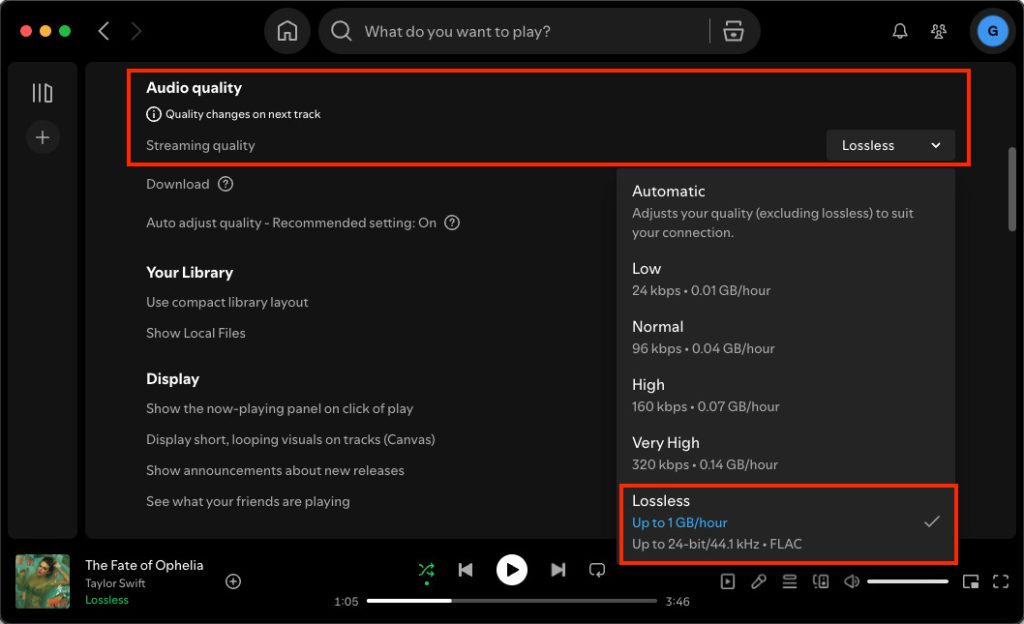
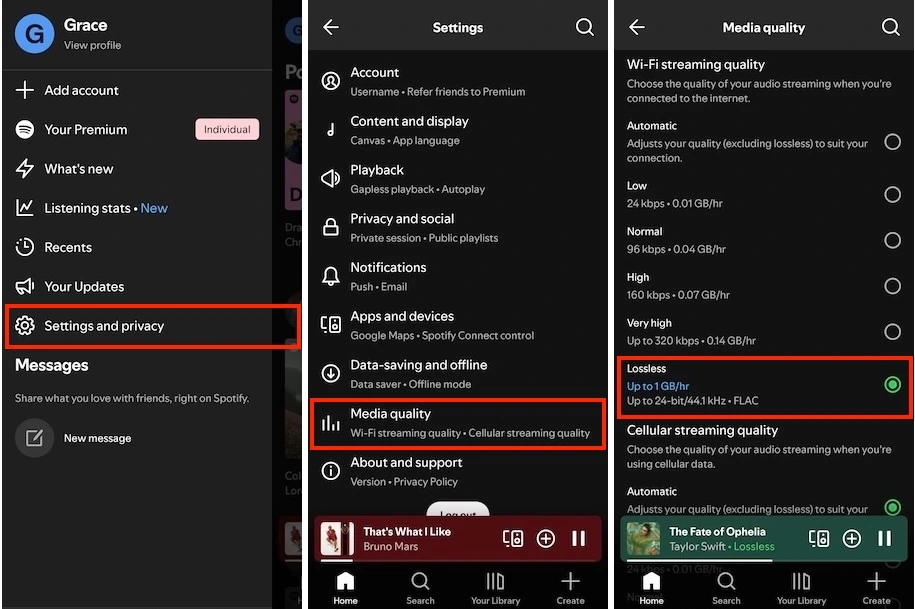
Here’s how you can get Spotify Lossless quality on desktop, mobile/tablet, and third-party devices with Spotify Connect. Make sure your Spotify app is running on 9.0.58 (mobile) or 1.2.67 (desktop) and above.
You can improve Spotify quality on desktop with the app. The web player doesn’t support quality changing. Premium users can only enjoy Spotify up to AAC 256kbit/s at the web player, and free users AAC 128kbit/s.
To change your Spotify audio quality to Lossless:
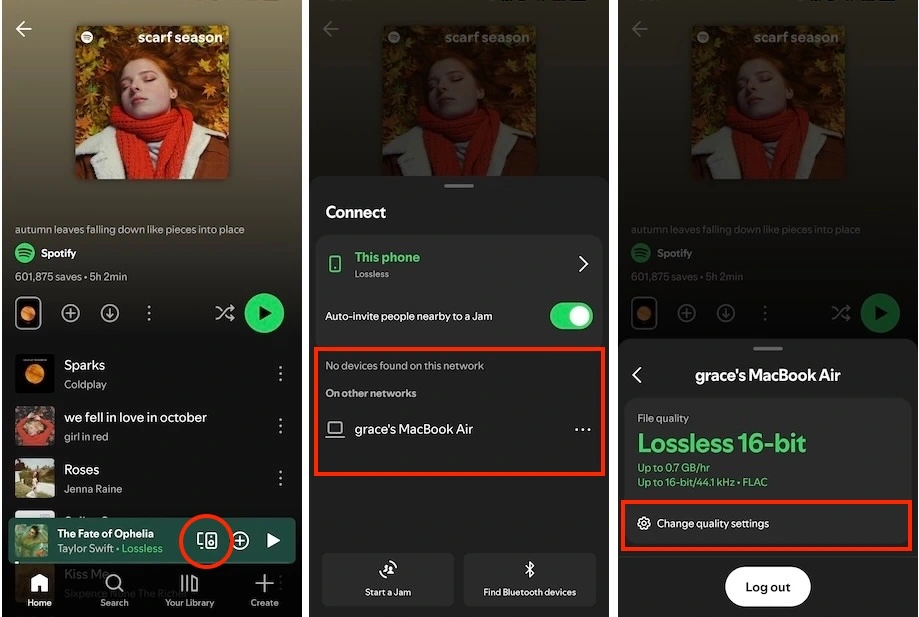
One of the best ways to enjoy Lossless audio is with a professional stereo system or speaker. Use “Spotify Connect” to control the playback and switch the quality settings from your mobile device.
With the arrival of Spotify Lossless, it joins a competitive field of streaming services that have offered lossless and even “Hi-Res” quality for years. Here is a comparison of Spotify’s offering against the major audiophile platforms, including Apple Music, Tidal, Amazon Music, Deezer, and Qobuz.
| Platform | Spotify | Apple Music | Tidal | Amazon Music Unlimited | Deezer | Qobuz Studio |
| Monthly Price | $12.99 | $10.99 | $10.99 | $12.99 ($11.99 for Prime members) | $11.99 | $12.99 |
| Hi-Res Capable? | No | Yes | Yes | Yes | No | Yes |
| Lossless Quality Options | Lossless: 24-bit/44.1 kHz | · Lossless: 24-bit/48 kHz · Hi-Res Lossless: 24-bit/192 kHz | · High: 16-bit/44.1 kHz · Max: 24-bit/192 kHz | HD/Ultra HD: 16-bit/44.1 kHz and 24-bit/192 kHz | High Fidelity: 16-bit/44.1 kHz | · CD: 16-bit/44.1 kHz · Hi-Res: 24-bit/96 kHz · Hi-Res: 24-bit/192 kHz |
| Key Attractions | Best-in-class music discovery and social integration | Spatial Audio, Apple ecosystem, Sing karaoke feature | exclusive content (interviews, documentaries, music videos, and live events) | Dolby Atmos, 360 Reality Audio, integration with Amazon devices | SongCatcher music recognition and Universal Music Sharing | Hi-Res track purchases and a premium booklet library |
If you are already happy with Spotify, the new lossless upgrade is a strong enough reason to stay. You get better sound without losing your familiar app and playlists you enjoy. However, if your priority is full Hi-Res Audio (up to 24-bit/192 kHz) and you listen through high-end wired gear, you may still need to explore other services like Qobuz, Tidal, Apple Music, or Amazon Music Unlimited to stream at the highest possible resolution.
Spotify Premium users in the launch areas can also choose to download music in Lossless. But please keep in mind that the download will use a lot more data, up to 1GB/hour. This is especially important if you’re on mobile data.
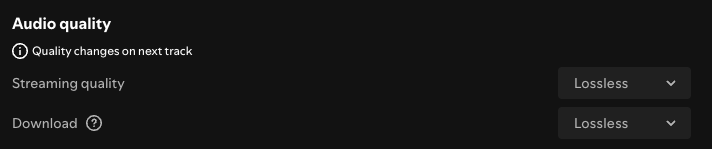
Furthermore, these downloads are only for offline playback within the Spotify app; they are not saved as exportable FLAC files. You will lose access to all lossless downloads the moment your Premium subscription expires. To continue accessing the lossless music, you’ll need a professional downloader like Pazu Spotify Converter.
With Pazu Spotify Converter, you can download songs, playlists, and albums for offline listening in Lossless FLAC, WAV and AIFF. This smart tool works with both Spotify Free and Premium. It can also convert music to other commonly used formats, including MP3, M4A, and AAC. After downloading, you can freely transfer the downloaded files to any compatible device or media player for offline enjoyment.
Here is how to use Pazu Spotify Music Converter to download Spotify songs as Lossless FLAC.
Download, install, and run Pazu Spotify Converter on your Mac or Windows. Log in to your Spotify account.

Click the gear icon in the top right corner. To download lossless audio(24-bit/48 kHz), choose FLAC, WAV or AIFF as output format.
Here you can also set output audio quality and path, organize the output files, rename output files, and more.

Search the songs, albums, or playlists you want to download. Click the Add to List button to load all songs in the album or playlist.

You can download individual songs or convert the entire playlist. To download an individual song or specific songs of your choice, simply uncheck the ones you don’t want.
Click the Convert button to start downloading the Spotify songs to your local computer.

Once done, click the Folder button or go directly to the output folder you customized in the previous step to find the downloaded songs.

Note: The free trial version of Pazu Spotify Converter enables you to convert the first three minutes of each song. You can remove the trial limitation by purchasing the full version.

Download and convert any Spotify songs, albums, playlists to MP3/M4A etc.