

YouTube Music and Spotify are the most popular music streaming services. Spotify is available in over 184 markets with 751 million users, including 290 million subscribers (early 2026). It has become the first and last word in music streaming, but Google’s YouTube Music offers an intriguing alternative that’s pretty distinct from the likes of Apple Music, Amazon Music and Tidal.
When it comes to Spotify vs YouTube Music, which one will complement your listening habits best? In this article, we’ll look at the two music streaming giants that are leading the audio streaming business – YouTube Music and Spotify – and try to find out the key differences between the two services. We’re going to be comparing YouTube Music specifically to Spotify to see which one is worth your money.
Both YouTube Music and Spotify offer free plans that allow users to stream music with ads. Since September 2025, Spotify free users can also pick and search for any song to play. You can skip the songs you don’t like with no limits. However, when playing a playlist, it still plays in shuffle on mobile for the free version.
YouTube Music’s free plan allows you to pick and play any track you like, making it much more helpful than Spotify in this regard. You can even skip tracks as many times as you want.
The most significant disadvantage of Google’s streaming service is that once you turn off the screen on your phone, the music stops. You need to keep the phone on all the time. You can’t lock the phone, and can’t play in the background. And forget about browsing the web while listening to music: as soon as you close the app, the music cuts off. Also, it’s horrible for driving because you can’t play it while using the GPS. To listen to the music while the phone is off, don’t use the YouTube app; instead, use the YouTube website.
Spotify doesn’t have this limitation. Free users can lock the screen, and music keeps playing in the background.
For Spotify free users, there are occasional ads that interrupt the listening experience. Audio quality is limited to 160kbps, and you can’t download songs for offline listening.
YouTube Music is also ad-supported and doesn’t allow you to download music. Audio quality is also limited: you can stream at a maximum of 128kbps.
Free YouTube Music lets you skip ads after 5 seconds, whereas Spotify does not. What’s more, Spotify free has more ads. Sometimes it is three 30-sec ads in a row when a song ends. There are also pop up ads that will stop the music. Spotify web player has fewer ads than the desktop and mobile apps.
YouTube Music Free only has limited access to lyrics, with users reporting 5 free lyric views. As of early 2026, both Spotify Free and Premium users can view lyrics of most songs.
Winner: Spotify
The primary drawback of YouTube Music Free is its lack of background playback; the music stops as soon as you lock your screen or switch apps. Additionally, Spotify offers slightly better audio quality (160 kbps vs. 128 kbps). While YouTube allows you to skip most ads after 5 seconds, Spotify remains the superior choice for the free version.
Both Spotify and YouTube Music offer free and Premium plans. We’ve covered the Free plan, and here is the Premium plan comparison.
You can get YouTube Music Premium with a subscription, and you can also subscribe to YouTube to get the Music Premium.
YouTube Muisc Premium
YouTube Premium
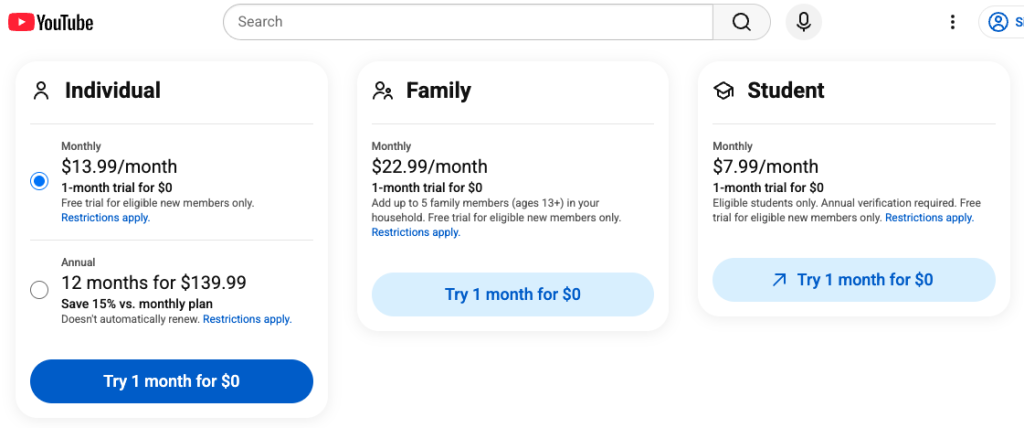
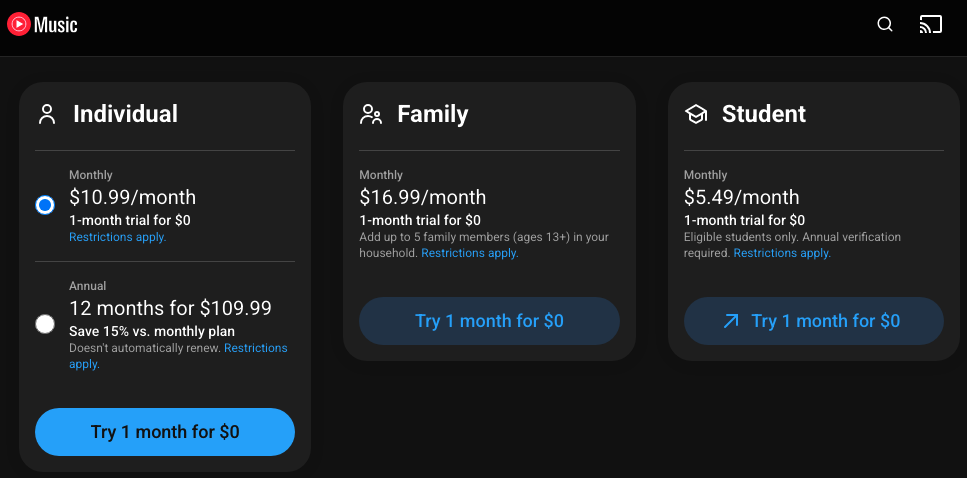
For $10.99 a month, you’ll unlock the YouTube Music Premium service and all of its added benefits mentioned above. Still, it’s worth noting that the YouTube Premium service, which also covers the main YouTube app, is just $13.99. If you also want to remove ads when watching regular YouTube videos, you may as well pay the three extra dollars. Then you’ll have YouTube Music Premium as part of your membership. YouTube Premium benefits also include downloading videos and background play. The song + video combo makes your life a whole lot better. Spotify does not have the same platform when it comes to video content.
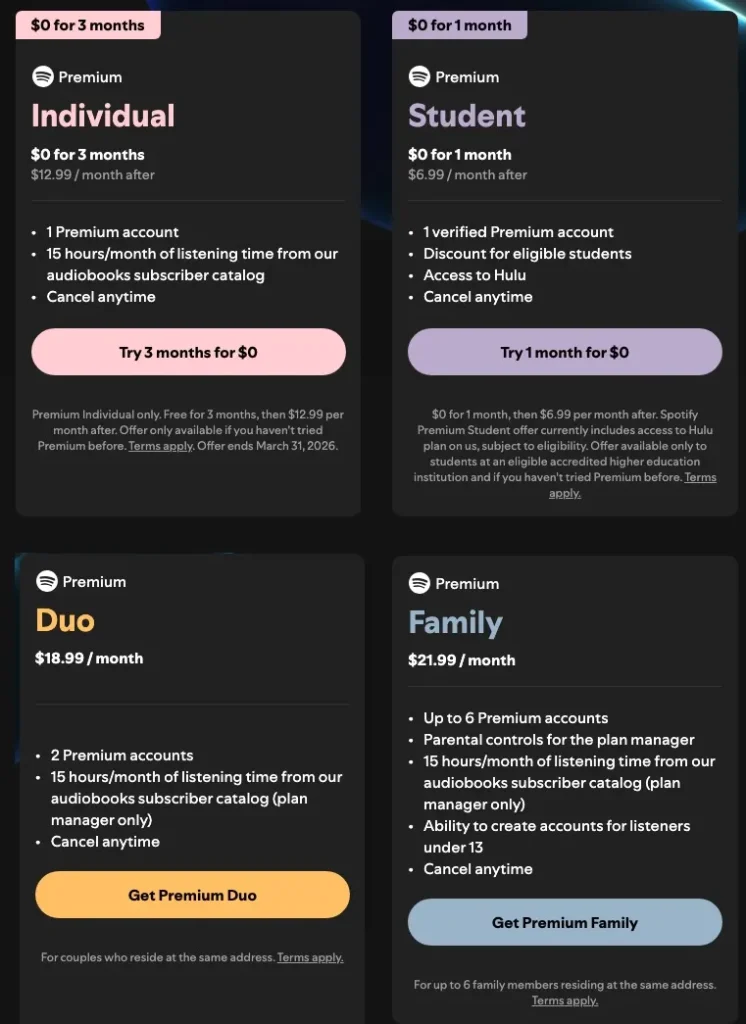
Spotify also offers Individual, Family, and Student plans. However, the price is generally higher than on YouTube Music across all categories. Spotify also offers a Duo plan to allow two people to enjoy the Premium benefits, which is lacking in the YouTube Music plan structure, but the price is also higher than the YouTube Music Family plan. Spotify Premium’s Family Play also offers access to Spotify Kids. In addition, Spotify sweetens the deal with student access to Hulu.
Spotify doesn’t offer Annual plans. There was a Spotify $99 Annual Card from Best Buy. However, this gift card does not apply to a full-year subscription due to the price increase.
Winner: YouTube
YouTube is more affordable for all the plans compared to Spotify. In addition, if you sign up for YouTube Premium ($13.99 USD/month), you will also be able to watch YouTube videos ad-free and enjoy other Premium benefits on the video platform.
However, Spotify Premium offers other benefits, such as Lossless music in over 50 countries and regions, and a massive library with podcasts and audiobooks, etc. For couples, the Duo plan can be another option to enjoy high quality music while saving money.
Both Spotify and YouTube Music offer access to over 100 million songs. The most significant difference between the two services in terms of content is that Spotify offers a wide selection of podcasts and audiobooks, while YouTube Music provides music videos. YouTube Music is known for more music-driven content, contrasting with the variety offered by Spotify.
YouTube Music has many music videos, as one would expect. They are a big part of the service. A list of recommended and new videos frequently shows up on the front page, and you can also check out various charts, including the top global 100 music videos. In addition, YouTube’s partnerships with Sony Music, Universal Music Group, and VEVO make it possible for users to choose from 70 million official music releases.

Spotify has millions of songs and countless playlists in different genres. As per the latest reports, Spotify consists of 100 million tracks, and approximately 60,000 tracks are added every day. The partnership of Billboards and Spotify has made it convenient for people to discover top and trending songs. The platform also comes with an Indie section that allows users to find independent artists and artists to gain Spotify views without having to scratch the surface or buy Spotify plays.
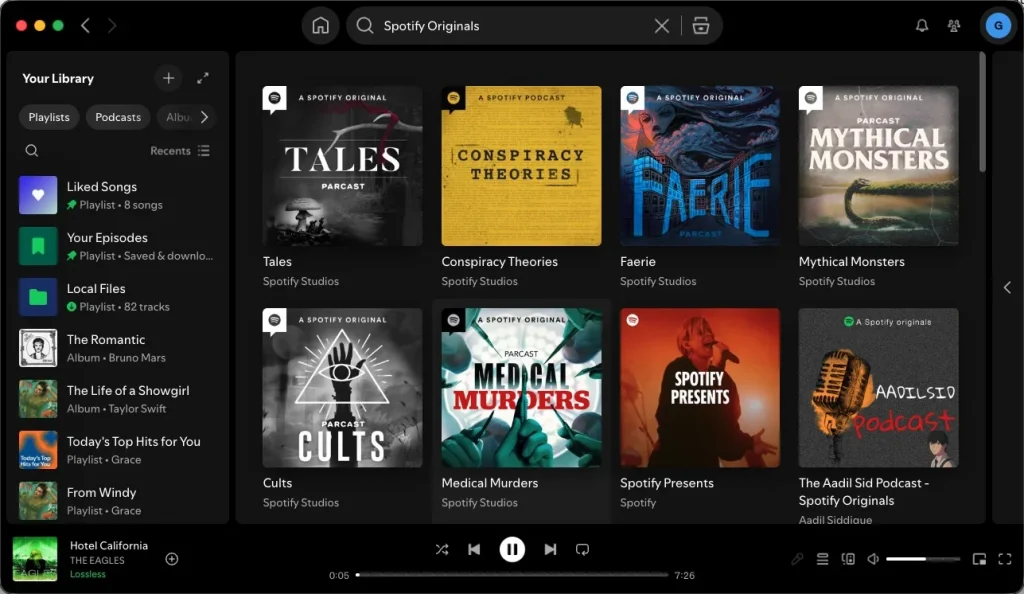
Spotify has over 7 million podcast titles and 500,000 audiobook titles as of early 2026. It remains the industry leader for podcasts, treating them as a core part of the app experience rather than an add-on. Spotify still holds the rights to many of the world’s biggest “Spotify Original & Exclusive” shows that you cannot find on YouTube Music.
YouTube Music finally rolled out podcasts for listeners in the US in April 2023 and began absorbing content from Google Podcasts in 2024. Almost all major podcasts available on YouTube are accessible within the YouTube Music app. You can find new podcast recommendations and unfinished episodes on the Home tab. However, currently, YouTube Music doesn’t officially support audiobooks.
Winner: Draw
While both Spotify and YouTube Music are popular music streaming services, the latter has the competitive advantage of being the second most popular search engine in the world, after Google, of course. This integration allows users to seamlessly access a massive library that includes not only official studio albums but also fan-made remixes, rare live performances, and covers unavailable on any other platform.
Well, the biggest difference between the two is their specific content ecosystems. While both platforms now feature extensive podcast libraries, Spotify remains the preferred choice for audio-first listeners due to its exclusive shows and a massive catalog of audiobooks (offering 15 hours of monthly listening for Premium members). On the other hand, YouTube Music stands out for those who prioritize music videos and visual content, allowing users to switch between audio and video modes with a single tap.
Both YouTube Music and Spotify have algorithms that monitor the songs and artists you like and those you skip. Spotify combines three different types of algorithms – Collaborative Filtering, Natural Language Processing, and Raw Audio Modeling – to figure out which songs you’re likely to thumb up. The popular Discover Weekly playlist contains songs from artists and genres you’re listening to. A new one is released every Monday with 30 tracks. Additionally, the service creates up to six daily mixes for you based on your listening habits. Spotify also has another great playlist called RADAR, which focuses on new, emerging talent. This type of feature is noticeably absent in YouTube Music.
YouTube Music offers four types of personalized playlists. The Discover Mix gives you 50 lesser-known tracks every week, the New Release Mix that contains the most recent releases by your favorite artists, and a set of mixes based on your listening habits. Then there’s the My Supermix, a combination of songs from different genres you like and includes 100 tracks. Google’s service also allows you to browse playlists by mood or genre, but the problem is that the selection is limited.
Winner: Spotify
Spotify seems to have many more playlists for each genre when compared to YouTube Music. More moods and genres are available to browse on Spotify than on Google’s streaming service. Spotify’s hybrid discovery algorithm is more successful at pinpointing which songs and artists you’ll most likely enjoy. While YouTube Music’s discovery algorithm isn’t bad per se, it feels like it needs more work to better harness its listeners’ tastes.
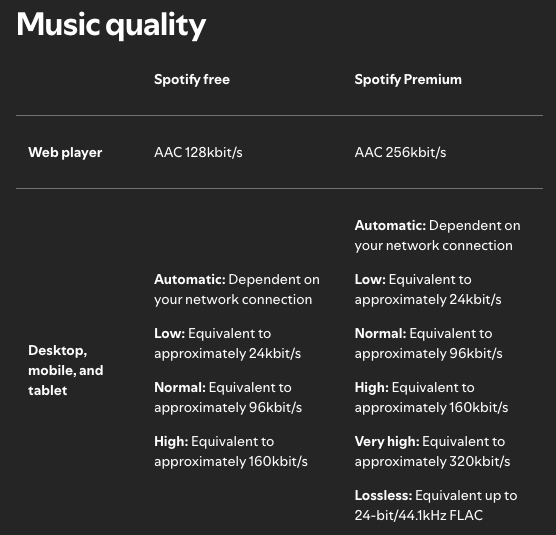
Both apps offer high-quality streaming. However, for Premium subscribers, YouTube Music is capped at 256 kbps, and Spotify’s goes up to Lossless (up to 24-bit/44.1 kHz FLAC) in over 50 markets and to 320 kbps in other areas.
For Free users, YouTube Music and Spotify offer audio at up to 128 kbps and 160 kbps. For those looking to save on data, YouTube Music provides a 48 kbps low option, while Spotify offers 96 kbps as an alternative.
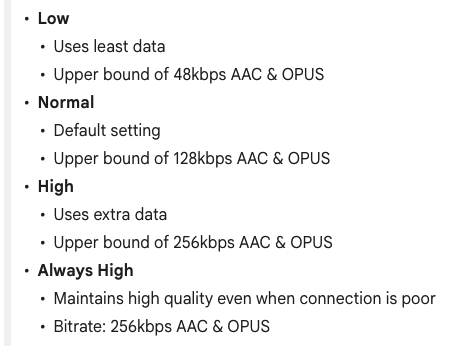
Both platforms allow their users to optimize sound quality. Spotify allows its users to choose from 5 or 6 options for sound optimizations, whereas YouTube Music only offers 4. The sound quality offered by Spotify is Low (24 kbps), Normal (96 kbps), High (160 kbps), Very High (320 kbps), and Lossless (24-bit/44.1kHz FLAC, for certain countries and regions). It also offers an Automatic mode that depends on your internet connectivity. On the other hand, the sound quality settings offered by YouTube Music are Low(48 kbps). Normal (128 kbps), High(256 kbps), and Always High(256 kbps).
Winner: Spotify
When it comes to sound quality, Spotify outshines YouTube. It is evident that the maximum sound quality you can get from Spotify is Lossless (up to 24-bit/44.1kHz FLAC) or 320 kbps, whereas you have to settle for YouTube Music at 256 kbps. Moreover, Spotify’s 320 kbps sound quality loads faster than YouTube Music’s highest quality.
Both YouTube Music and Spotify have easily accessible browser-based versions, Android, and iOS apps. Besides, Spotify also has a desktop app for Mac and Windows PC, while YouTube Music doesn’t. If you have a Spotify Premium account, you can download music to listen offline with the desktop app.
Winner: Spotify
Spotify lyrics, provided by Musixmatch, are available on the mobile/desktop app, web player, gaming consoles, and TV, whether on the free or premium tier.
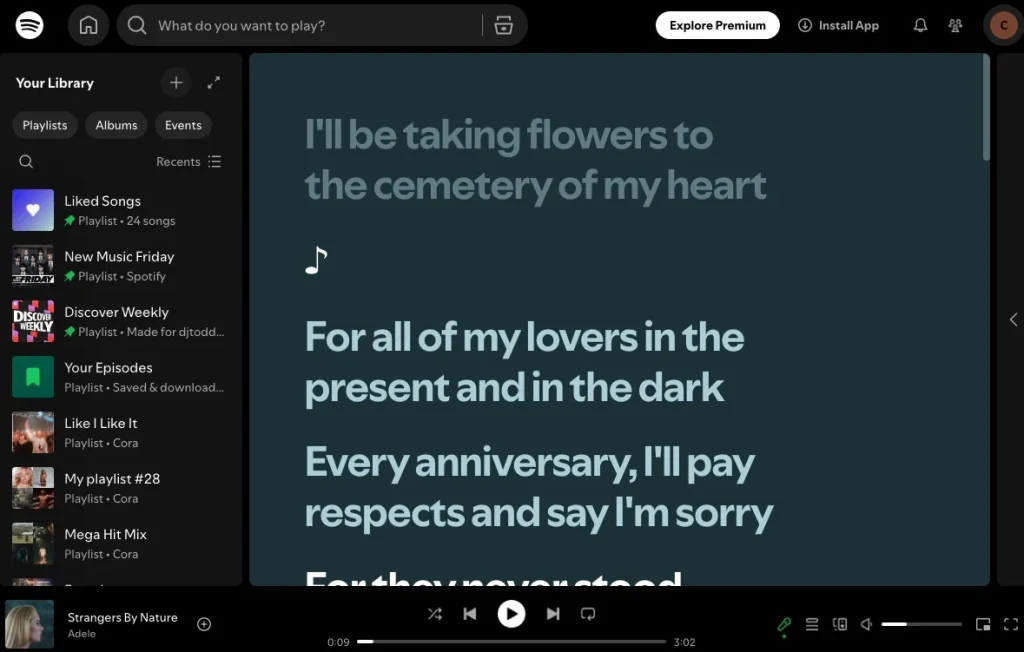
YouTube Music also provides lyrics from Musixmatch and LyricFind. But free users can view lyrics only on Android and iOS, not in the web player. As of February 2026, some users reported that YouTube Music now limits the free version to view full lyrics for five songs per month. However, YouTube hasn’t confirmed this change.

Winner: Spotify
Add your personal music collection to your YouTube Music library by uploading your songs and albums. Once your music is uploaded, you can use YouTube Music to play it as part of your listening experience, for both Premium and Free users. You can upload up to 100,000 songs to your YouTube Music library.
Spotify also supports access to your local music; however, only Premium users can access uploaded music on another device.
YouTube Music and Spotify both have Garmin apps, and you can listen to them offline with a Premium subscription. However, the YouTube Music app is still noted for being slightly buggier than Spotify’s. Furthermore, YouTube Music still lacks support for Apple Watch, and it’s not possible to listen offline on an Apple Watch. You’ll need the phone with you at all times. So if you want to listen to music on a Garmin or Apple Watch, Spotify is a better choice.
YouTube Music doesn’t support Alexa, while Spotify does.
Spotify vs. YouTube Music is a hard one to call, as the services are so different. Spotify has earned its reputation owing to its features, content, and updates. It also gives new artists scope to gain Spotify plays with minimal effort. YouTube Music is better if you don’t want to spend money and are satisfied with a free plan. Also, its integration with the YouTube video platform is attractive.
However, different listeners have different deal breakers and preferences. The best choice is to try both free trials and see which one works best for you. If you want to upgrade to Premium, YouTube offers a one-month free trial for all plans, and Spotify offers one or three months free trial for its Individual and Student plans.
Both Spotify and YouTube Music offer free trials for Premium. So if you’re still on the fence about which one to go with, test both first to see which you like better. However, the two major trade-offs of using YouTube Music for free are the occasional ads between tracks and the inability to download music to listen to offline. If you are a YouTube Music free user, do you want to break the limits of YouTube Music? If you are thinking about downloading YouTube Music offline with the Free Plan rather than upgrading to a Premium subscription, you can use Pazu YouTube Music Converter.
Pazu YouTube Music Converter downloads songs from YouTube Music and converts them to MP3, AAC, WAV, FLAC, AIFF, or M4A format. It can keep ID3 tags and preserve lossless audio quality. With it, you can listen to YouTube Music offline without any ad interruptions. Now, follow the steps below to download YouTube Music for offline listening with a Free Plan.
To get started, download, install, and run Pazu YouTube Music Converter on your Mac or Windows PC, which features a built-in YouTube Music web player.
If you have already purchased a license, click the key icon to register the converter. If not, continue using the trial version.
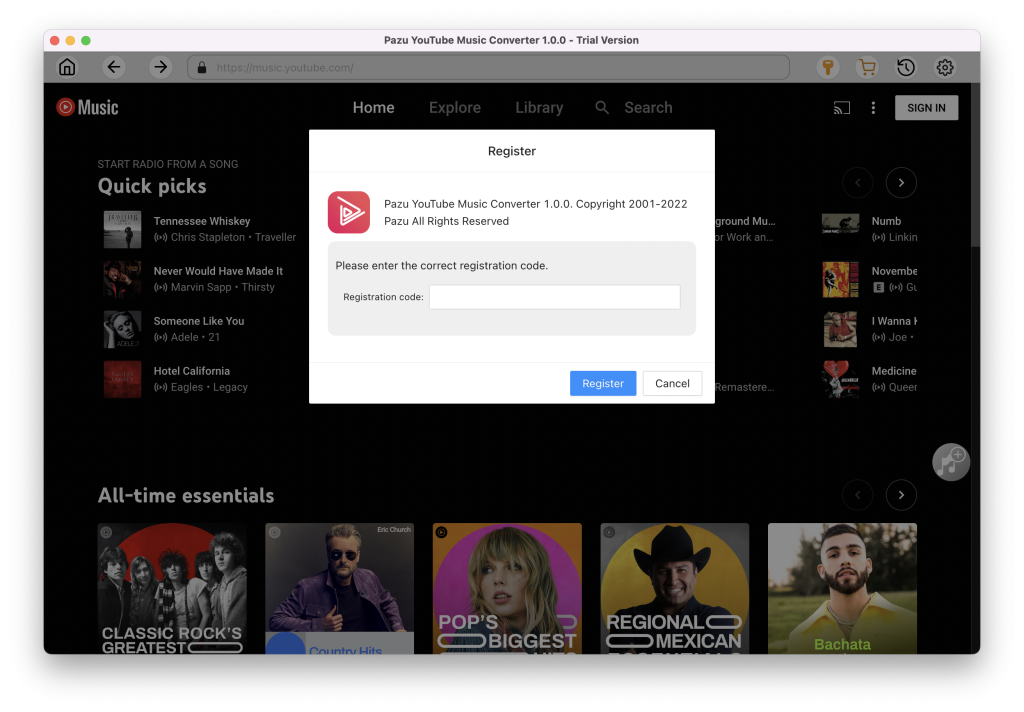
You don’t need to sign in to your YouTube Music account.
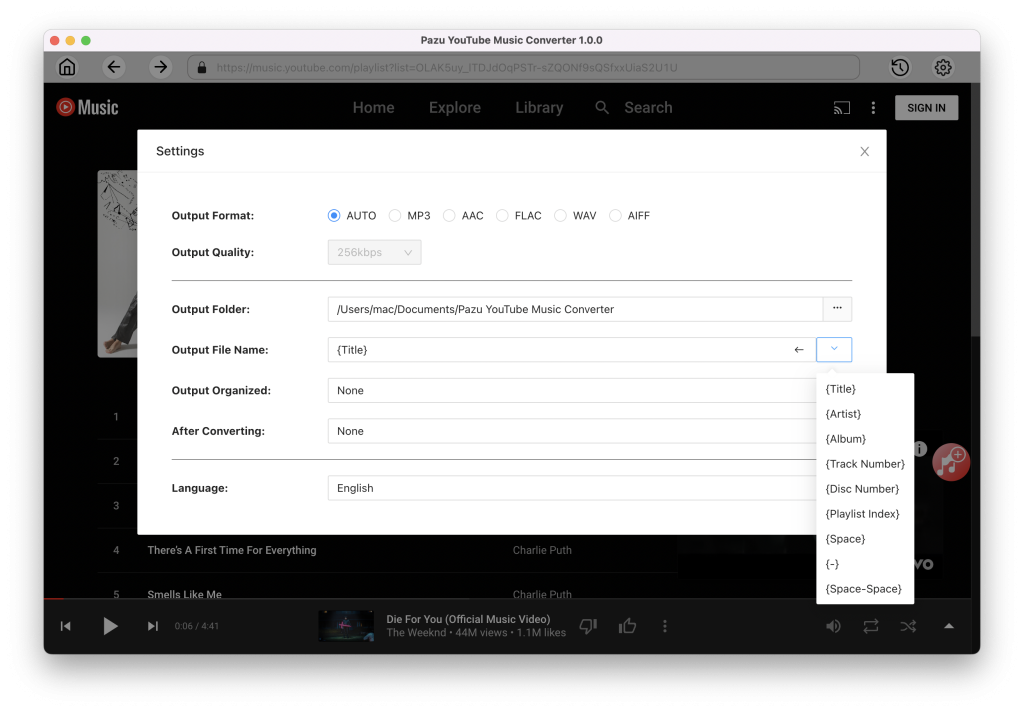
Tap on the Settings gear icon to change the output settings. The default output format is MP3. Pazu YouTube Music Converter also supports M4A, WAV, FLAC, AIFF, AAC. You can also change bitrate, samplerate according to your needs.
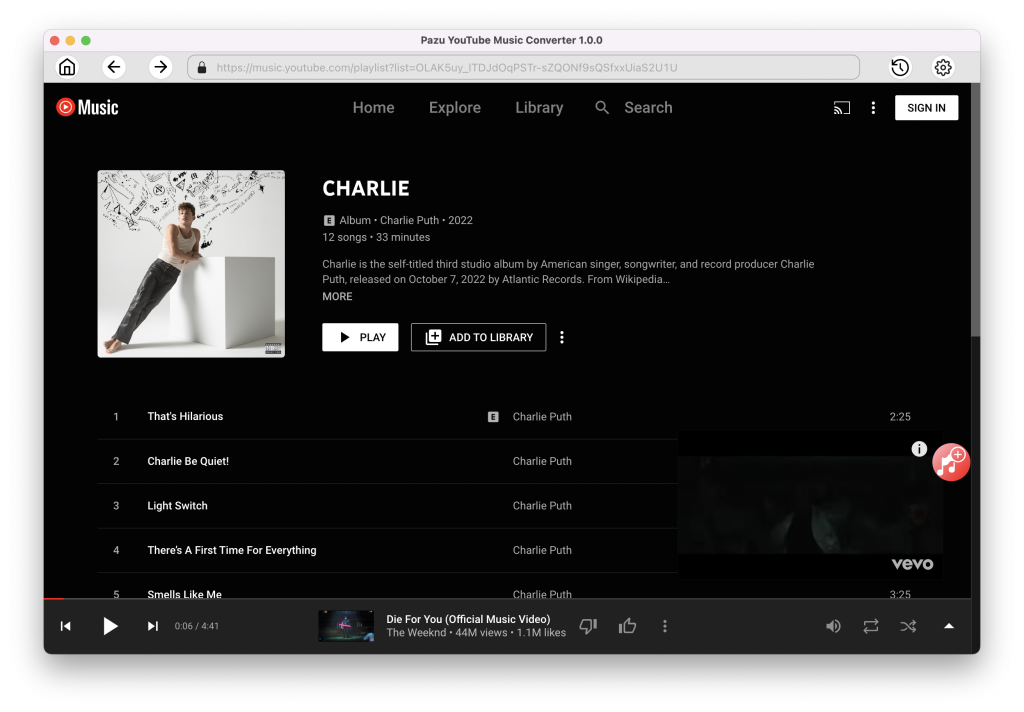
Click a playlist or album you want to download. Then click the red Add to list button to load songs.
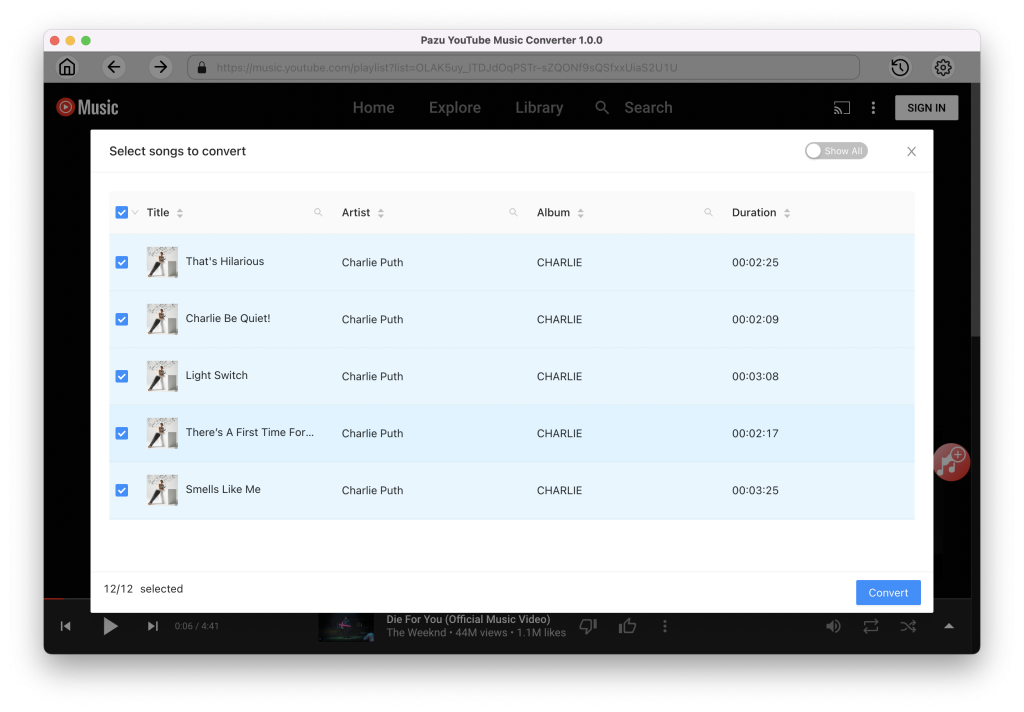
All songs in the playlist will be added by default. You can uncheck the songs you don’t want to get.
After selecting the songs, click Convert button to start downloading YouTube Music songs to the format you choose. You will see a progress circle indicating your music is downloading.
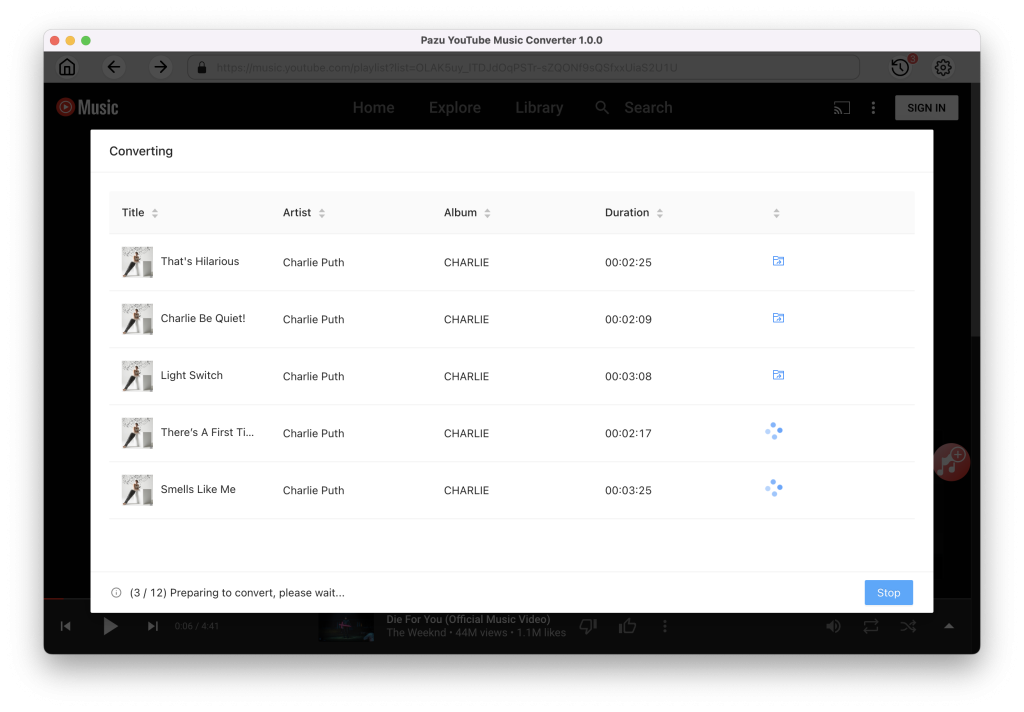
Once the songs have been downloaded, click the folder icon to quickly locate the DRM-free YouTube Music songs in the format you choose. You can then transfer and play it anywhere.
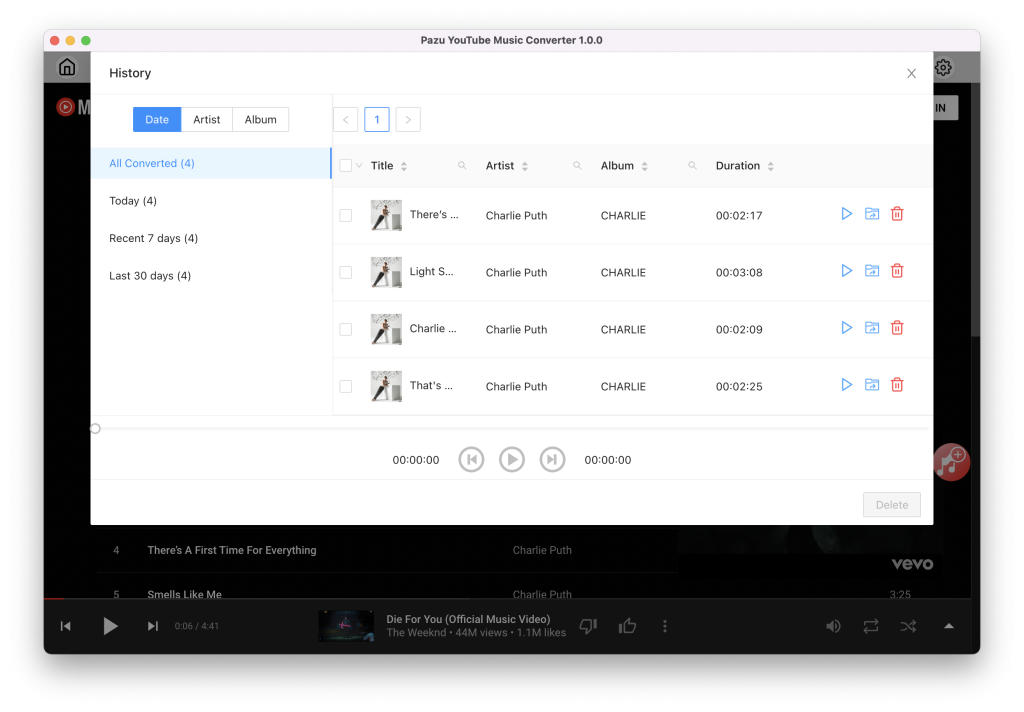
To view or manage all music you’ve downloaded, click the clock icon on the top right corner of the YouTube Music Converter interface.

Download and convert any Spotify songs, albums, playlists to MP3/M4A etc.