
Spotify is one of the most popular music streaming services in the world. It offers free and premium plans. You can stream Spotify music with WiFi or mobile data. However, it’s essential to be mindful of the data consumption of Spotify, especially when traveling abroad as data charges can be expensive.
In this article, we will cover everything you need to know about how much data Spotify uses and how to reduce Spotify data usage. We will also introduce you a powerful tool that allows you to download Spotify music without Premium so you can save data even with Spotify free.
Contents:
How much data does Spotify use varies depending on the audio quality setting you opt for. Here's a breakdown based on various sources:
Low Quality (24 kbps) :
Around 0.18 MB per minute.
Normal Quality (96 kbps) :
Around 0.72 MB per minute.
Alternatively, another source mentions 2-3 MB per minute, although this seems to be an outlier.
High Quality (160 kbps) :
Data usage for this specific quality setting wasn't provided, but it's expected to be higher than the normal quality setting.
Very High Quality (320 kbps) :
Estimates suggest 150-250 MB per hour, translating to approximately 2.5-4.17 MB per minute.
Average Usage :
On average, around 500 KB of data is needed to stream music for a minute on Spotify.
Other factors, such as caching, also affect Spotify's data usage. Songs you've listened to before may not consume the same amount of data when played again.
Spotify's built-in Data Saver feature helps you reduce the app’s data usage by showing fewer images and reducing audio quality.
You can also switch Audio-only podcasts on under Data Saver, which means it doesn’t download their videos when you download podcasts.
On desktop
On mobile
If you have Premium, you can download music when connected to WiFi to listen offline. What to do if you don't have Spotify Premium? Well, with Pazu Spotify Converter you can easily download Spotify music even with Spotify free.
Pazu Spotify Converter is a professional tool used to convert Spotify music to MP3, M4A, WAV, FLAC, OGG, AIFF. No matter using a free account or a paid one, you can use it to download Spotify songs at 5X faster speed on PC/Mac. Another highlight feature of Pazu Spotify Converter is its high-quality output files. It can keep 100% original Spotify files, including all ID3 tags. Thanks to Pazu Spotify Converter, you can download Spotify songs for free. In the following tutorial, we will show you how to download Spotify music with the free account.

Download, install and run Pazu Spotify Converter on your Mac or Windows. Log in your Spotify account with the built-in Spotify web player.

Browse songs, albums or playlists you want to download from the built-in Spotify web player.
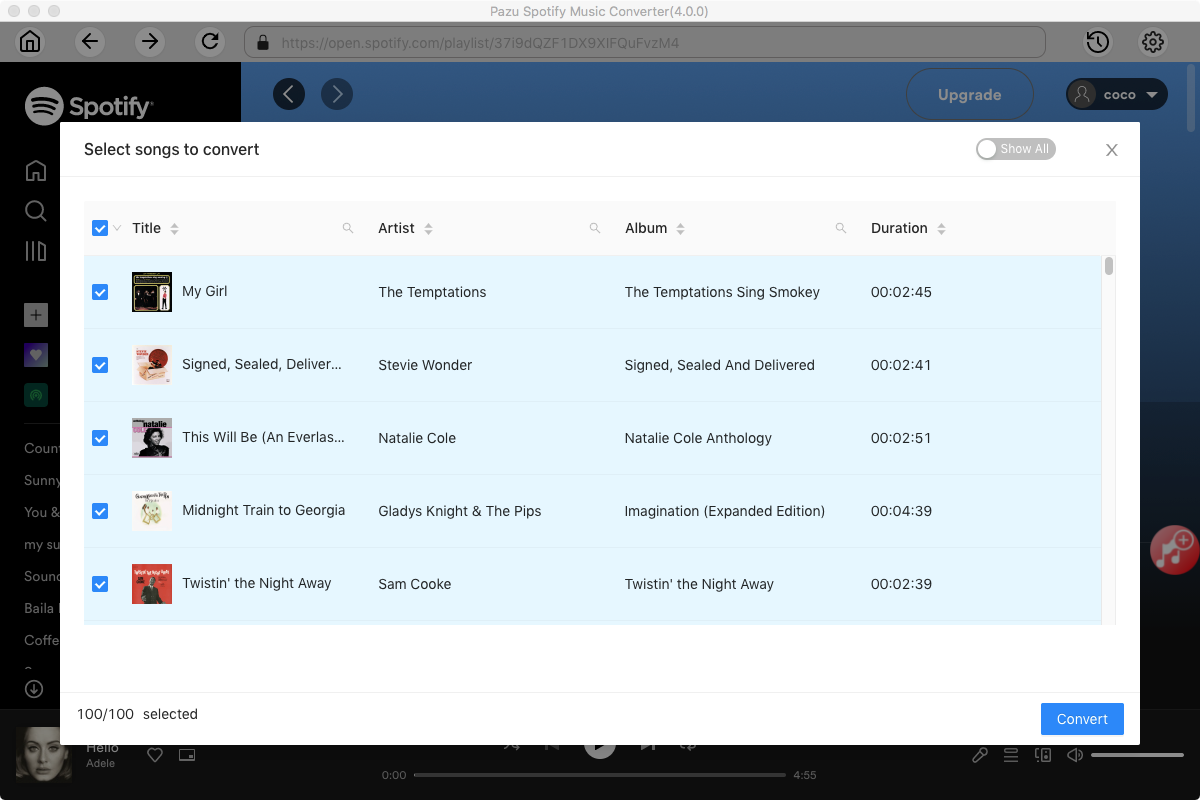
Now, click on the Settings cogwheel from the top-right corner to select the output format. On Auto mode, it will save the file in M4A format. For MP3 and AAC, you can also set the output quality, depending on the song. You may also change the output folder, the title, and the organizing criteria.

Click the Convert button to start downloading Spotify songs in MP3 format.

Once the conversion is done, click the folder icon to find the converted Spotify songs. Now you can play the downloaded Spotify songs offline and save data.

Note: The free trial version of Pazu Spotify Converter enables you to convert the first three minutes of each song. You can remove the trial limitation by purchasing the full version.
Buy Now Buy Now

Download and convert any Spotify songs, albums, playlists to MP3/M4A etc.