
Pandora is a music streaming and discovery app. It lets you create "stations" based on songs, artists, or genres that you like, which then play related songs. Spotify is an audio streaming service launched in Europe in 2008 and has since expanded to most major markets, including the United States, Canada, and Australia. Which one is better, you ask? Read on to find out. We will compare the essential features of Spotify Premium and Pandora Premium and choose the best streaming service for you from Spotify vs Pandora.
Spotify free users will see banner ads within the official apps and hear the occasional audio ads between songs as a trade-off. Spotify Premium costs $10.99 a month, while the Spotify Premium for Students option costs $5.99 a month. A Spotify Premium for Family payment option is also available for $16.99 per month. It gives up to six people who live together full access to all Spotify Premium benefits on all of their accounts. The Spotify Duo plan includes two Premium accounts for $14.99 per month.
The free Pandora service is also ad-supported by pop-up web and audio ads on your streaming media devices. The audio ads repeat every three or four songs. Pandora offers Pandora Plus and Pandora Premium. The $4.99-per-month Pandora Plus is a more traditional plan that builds on the free tier by adding ad-free personalized stations, unlimited skips, and offline listening. Pandora's highest-level plan, Premium, costs $9.99 per month and adds playlist creation and sharing to Pandora Plus' feature set. There is also a Pandora Premium Family plan, which offers all of the features of Premium to up to six unique Pandora accounts. The Pandora Premium Family plan is priced at $14.99 per month.
Spotify defaults to a variable ‘Automatic’ setting and offers four fixed playback tiers: 24 kbps (Low), 96 kbps (Normal), 160 kbps (High), and 320 kbps (Very High).
Pandora Premium subscribers can select Low (32Kbps AAC+), Standard (64Kbps AAC+), or High (192Kbps MP3) audio settings. Pandora lacks Hi-Res Audio, a better-than-CD-quality music class.
Spotify’s discovery features include personalized playlists such as Discover Weekly and Release Radar, suggestions for songs to add to your existing playlists, and radio stations based on tracks, artists, and albums. These dynamically change based on your listening habits or selected songs.
The most straightforward way of discovering music on Spotify is via the highly personalized “Discover Weekly” playlist. Every start of the week, you’ll get a playlist filled with 30 tracks that you have never listened to on the platform.
Similar to Discover Weekly, the Release Radar is a dynamic playlist that populates itself based on your listening habits and library. Every Friday, the playlist is updated with 30 brand new songs from artists that you’re currently following, as well as new music from artists that you might not have listened to.
Pandora user has to create a radio. Pandora then chooses other libraries that are similar to the song or artist you had chosen. It has “The Music Genome Project.” This system analyzes songs using over 400 distinct musical characteristics collated by music analysts. Based on the information provided by the Music Genome Project, Pandora finds unique characteristics such as instruments used, rhythm, melody, the gender of a singer, etc. By those features, the service matches the songs that are as much as possible similar to what you chose.
Spotify’s music library has likely increased to about 70 million. This puts them above competitors. Spotify also offers a wide selection of podcasts – 2.2 million titles, to be exact. In recent years, the streaming service has been steadily improving its podcast offerings by acquiring more content specialists. Other types of content available on the app include: video podcasts, audiobook collection, ambient playlists for relaxation and meditation, spoken-word tracks, and global chart hits sourced from 69 different regions around the world.
There’s less certainty about the amount of music in Pandora’s library. Pandora’s Browse section has 29 different categories that cover all the main music genres, from Pop to World Music. This is markedly less than the 60 categories found on Spotify. Pandora is also making waves as a strong podcast platform. Pandora has over 25 different genres in its podcast arsenal, amounting to as many as 600,000 episodes. But with the acquisition of a couple of podcast platforms, that number has definitely gone up. Other available content types also include: ambient nature sounds for sleep, poetry and spoken word stations and live performance playlists taken from the Pandora Live virtual concert series.
Pandora cannot seem to keep up with Spotify’s overall performance and reach. Spotify affords you better audio quality, music content, underground music, and music discovery options like Discover Weekly. If you’re the type of music listener who is constantly searching for your latest favorite artist or song, Pandora is a reasonable investment. We hope that this review has helped you come closer to the answer you’re looking for.
Pazu Spotify Converter is a utility designed to help you download your favorite albums and tracks from Spotify without too much hassle. With Pazu Spotify Converter, you can customize the output format as MP3, M4A, WAV, FLAC, OGG, AIFF. And you can change the channel, bit rate, sample rate. It runs at 5X speed and keeps all the ID3 tags, metadata, album cover, artist, author etc. Please follow the quick steps to use it to download and convert Spotify music.

Download, install and run Pazu Spotify Converter on your Mac or Windows. Log in your Spotify account with the built-in Spotify web player.

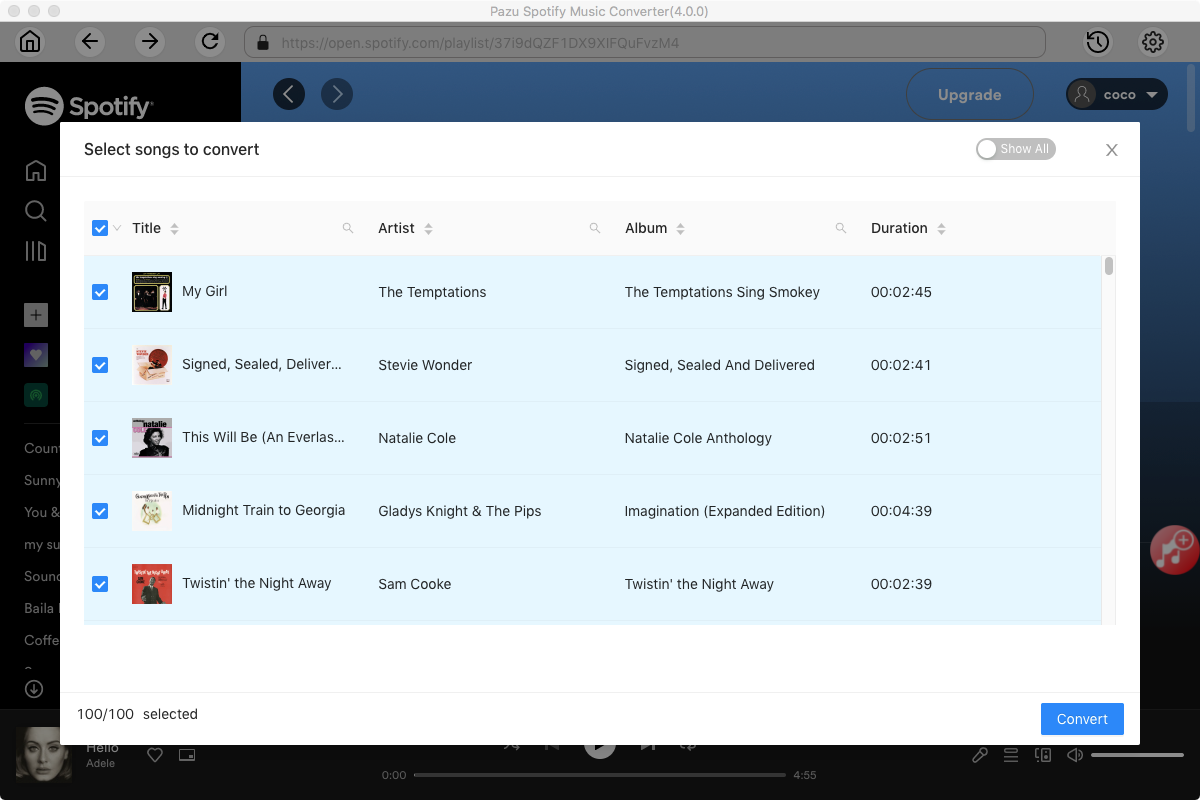
Pazu Spoitfy Converter features built-in Spotify web player for you to browse or search Spotify songs, albums and playlists you want to download directly on the interface. You don’t need to install Spotify app. Click the album or playlist you want to download and then click the red icon to load all songs.
The default output format is MP3. Pazu Spotify Converter also supports M4A, WAV, FLAC, OGG, AIFF. Click Option button to change output format or output folder if you need. You can also change bitrate, samplerate according to your needs.

Click Convert button to start recording Spotify music to the format you choose.

After conversion, click the folder icon to quickly locate the DRM-free Spotify song. You can then move and play it anywhere.

Note: The free trial version of Pazu Spotify Converter enables you to convert the first three minutes of each song. You can remove the trial limitation by purchasing the full version.
Buy Now Buy Now
Download and convert any Spotify songs, albums, playlists to MP3/M4A etc.