
Grand Theft Auto V (also known as Grand Theft Auto Five, GTA 5, GTA V, or GTAV) is a video game developed by Rockstar North. The game is set circa 2013 in the city of Los Santos and its surrounding areas and tells the stories of three protagonists: Michael De Santa, Franklin Clinton, and Trevor Philips. As one of the most eagerly-awaited video game titles to be released in 2013, the game was widely anticipated before its release. Grand Theft Auto V was released to universal acclaim, holding scores of 96 and above on MetaCritic and GameRankings, as well as receiving perfect scores from over 30 reviewers.
One of the cool things about GTA 5 PC is the ability to create a custom Self Radio station based on your collection of digital music files. With the Self Radio option, it is really easy to play your favorite music on GTA 5. All you need to do is add your music into the proper folder (usually C:\Users\[username]\Documents\Rockstar Games\GTA V\User Music), and then you can listen to them on the Self Radion station in the game.
You have a few different options for listening to these custom soundtracks. They can be played sequentially, shuffled, or have the game integrate them into a radio experience complete with commercial breaks, station IDs, bumpers, and talk between DJs Cliff Lane and Andee, who also hosted Lips 106 in Grand Theft Auto: Liberty City Stories. In the pause menu you can choose whether you want to have the songs play in the order you have them in the folder or to let the game analyze the collection and build a playlist.
However, you should import audio files in MP3, AAC (M4A), WMA, or WAV formats. Other audio extensions such as FLAC, OGG, or copy-protected AAC (such as iTunes’ m4p file extension) do not work in GTA 5. If you want to play Spotify on GTA 5, you need to download Spotify songs and convert them to MP3, M4A, AAC, WMA, or WAV. Thanks to Pazu Spotify Music Converter, you can download and convert Spotify songs to GTA 5 supported formats, then you can play them on GTA 5 directly.
Pazu Spotify Converter is dedicated to downloading and converting Spotify music from OGG Vorbis to MP3 , M4A, OGG, WAV, AIFF, and FLAC format for both Spotify free users and premium users. It ensures a 100% lossless quality while downloading and converting songs for you. It can preserve original ID3 tags and metadata information, such as title, artist, album, genre, and so on. Here’s how to add your Spotify music to GTA 5 on the PC.

Download, install and run Pazu Spotify Converter on your Mac or Windows. Log in your Spotify account with the built-in Spotify web player.

Browse songs, albums or playlists you want to download from the built-in Spotify web player.
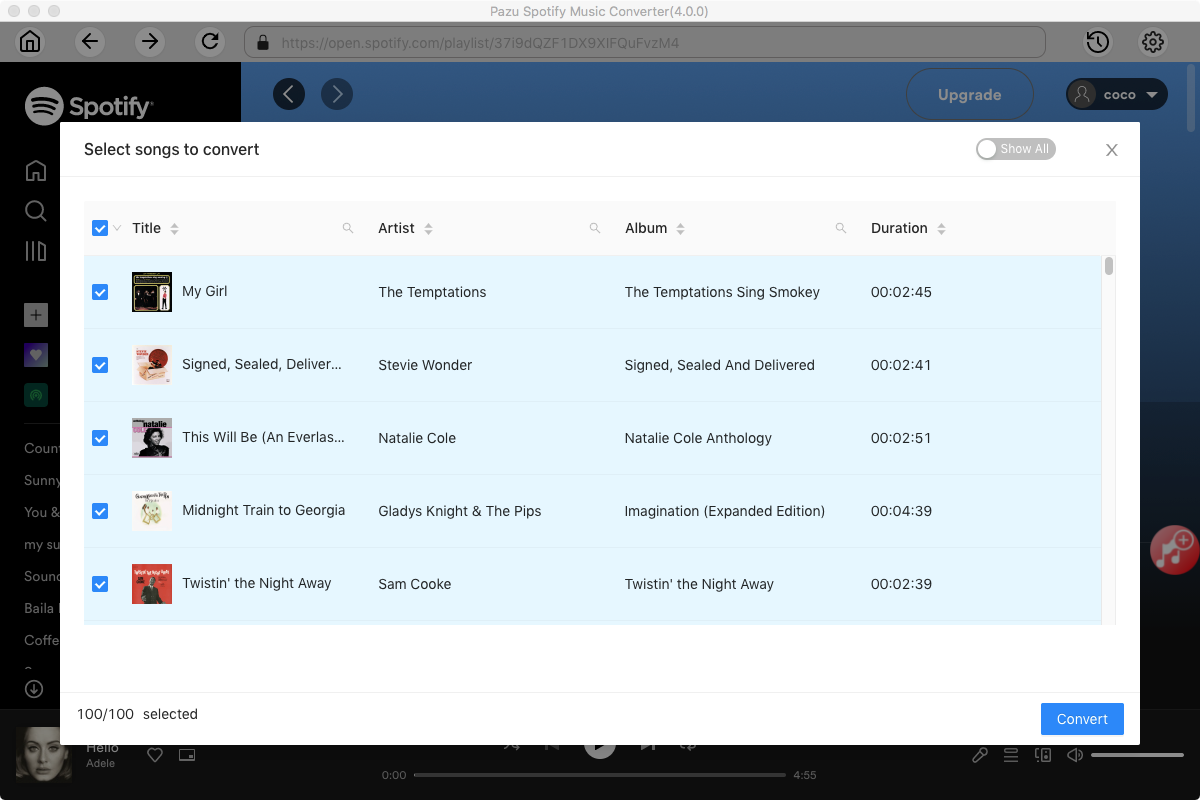
Now, click on the Settings cogwheel from the top-right corner to select the output format. On Auto mode, it will save the file in M4A format. For MP3 and AAC, you can also set the output quality, depending on the song. You may also change the output folder, the title, and the organizing criteria.

Click the Convert button to start downloading Spotify songs in MP3 format.

Once the conversion is done, click the folder icon to find the converted Spotify songs.

1. Add Spotify songs to GTA 5 music folder
Navigate to the GTA 5 Custom Music folder C:\Users\[username]\Documents\Rockstar Games\GTA V\User Music. Copy all converted Spotify music files into the GTA 5 Custom Music folder and then launch GTA 5.
2. Perform full scan for music
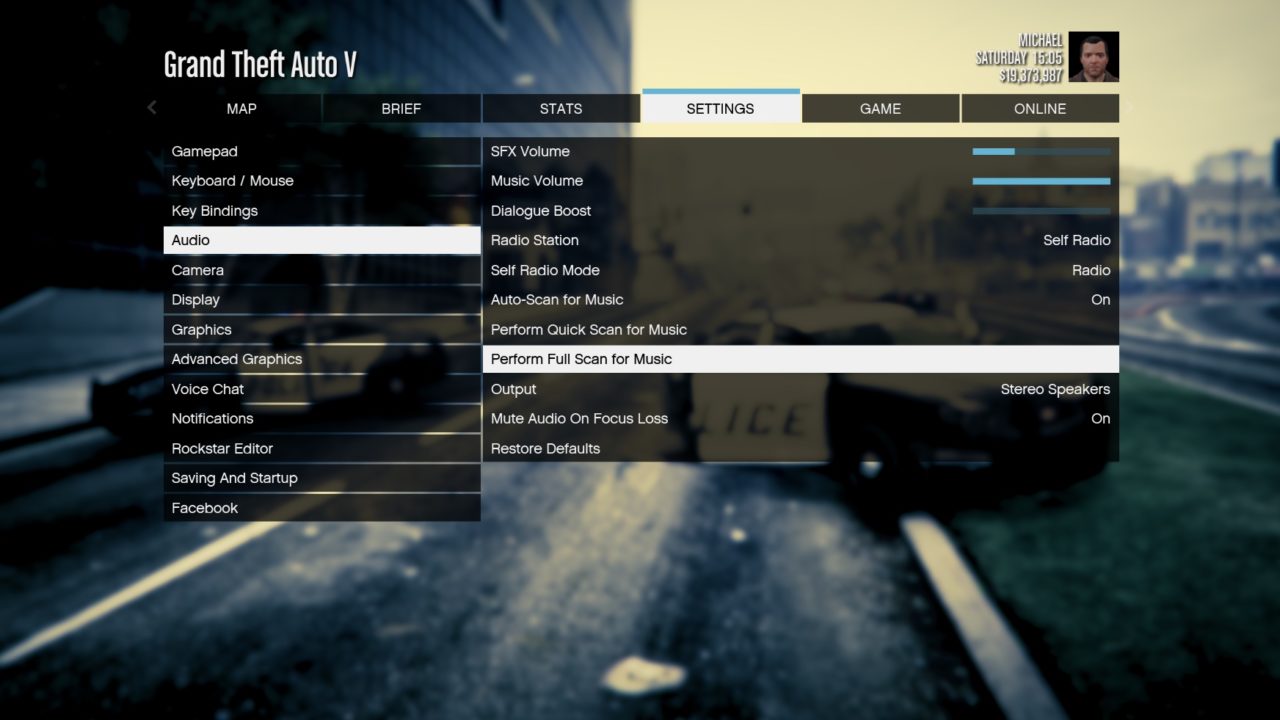
When the game is loaded, pause the game and navigate to Settings > Audio. Select Perform Full Scan for Music, and the game starts to process the information, the length of which gets based upon the number of songs in your GTA 5 Custom Music folder.
3. Customize the playback settings
When GTA V finishes processing your music, move the selection up to the Self Radio Mode option and choose one of the following settings: Radio, Random, or Sequential.
– Radio creates a truly custom radio station by playing your songs in a random order with DJs, advertisements, and news updates automatically interspersed in your playlist.
– Random plays only your GTA 5 custom music tracks in a random order without any interruptions from DJs, commercials, or news.
– Sequential plays only your GTA 5 custom music tracks without interruptions but in the sequential order listed in the Custom Music folder.
4. Play Spotify on GTA 5
With your selection made, return to the game and enter a vehicle. Use the radio station selection wheel, and you’ll see a new station called “Self Radio” at the top of the radio station circle. Choose the option to hear your Spotify songs based on your chosen Self Radio Mode option.
Note: The free trial version of Pazu Spotify Converter enables you to convert the first three minutes of each song. You can remove the trial limitation by purchasing the full version.
Buy Now Buy Now
Download and convert any Spotify songs, albums, playlists to MP3/M4A etc.