
Spotify is the world's largest music streaming platform by number of users. Users have access to one of the largest music collections in history, as well as podcasts and other audio content, simply by signing up.
The app is available in desktops, mobiles, tablets, some cars, TVs, games consoles, smart watches and more. However, like other music streaming services, you can't play Spotify music on regular devices, such as MP3 players, wearables, etc. To break this limitation, you need a Spotify ripper to rip music from Spotify to MP3.
In this article, you will learn the best way to rip Spotify to MP3 at 320Kbps to play them on any MP3 player or other devices. These are the Spotify rippers we’d trust with our own tunes.
You May Like:
Spotify ripper, as its name suggests, is specially developed to rip out the protection of Spotify songs without losing audio quality. With the advanced Spotify Music Ripper, you can not only remove Spotify protection, but also rip MP3s from Spotify. in other words, you can freely listen to Spotify songs, albums, playlists and podcasts offline on any device, even without a premium Spotify account.
Of course, not all Spotify rippers are the same. The quality of those ripped files will never be as good as the original Spotify music due to errors when data is read, and compression when it’s encoded. That’s why it’s vital to choose a professional Spotify ripper that keeps the audio files as close to the original Spotify music as possible, with complete and accurate metadata, encoded in 320kbps MP3 or lossless FLAC.
https://spotidown.app is a user-friendly online tool that allows you to easily rip any Spotify song online as an MP3 file in 320kbps. It is compatible with both desktop and mobile browsers and automatically includes metadata such as the cover image, artist, and release year in the downloaded songs if this information is available. It is able to rip Spotify playlists, but only downloads 2 tracks for free. To download more songs, you need to subscribe to premium.

This online tool lets you quickly and easily download any song, album, or playlist from Spotify.
Enter the URL of the song, album, or playlist you want to download, and our Spotify Downloader will take care of the rest.
You can then save the songs to your computer or mobile device for offline playback.

Pazu Spotify Converter is a professional Spotify ripping program for Windows/Mac that lets you extract digital audio tracks directly from Spotify music streaming service to MP3, M4A, AAC, FLAC, WAV and AIFF audio files. Pazu Spotify Converter uses the most advanced ripping technology to rip Spotify songs. So, it will keep the lossless audio quality of Spotify songs for you. The ID3 tags, metadata such as the year, album cover, etc. will be kept also. Pazu Spotify Ripper can rip music from Spotify to MP3 with 320kbps audio quality while completely removing ads and protections from songs and playlists. Pazu Spotify Converter is the best choice to get Spotify Premium free .

Follow the below steps to use Pazu Spotify Ripper to rip Spotify music to 320kbps MP3.
Download, install and run Pazu Spotify Converter on your Mac or Windows. Pazu Spotify Converter has a built-in Spotify web player, so you don't need to switch between Spotify app and this converter. It means you can directly rip MP3 from Spotify with this Spotify Converter, saving them to your computer for enjoyment or management. Log in your Spotify account with the built-in Spotify web player.

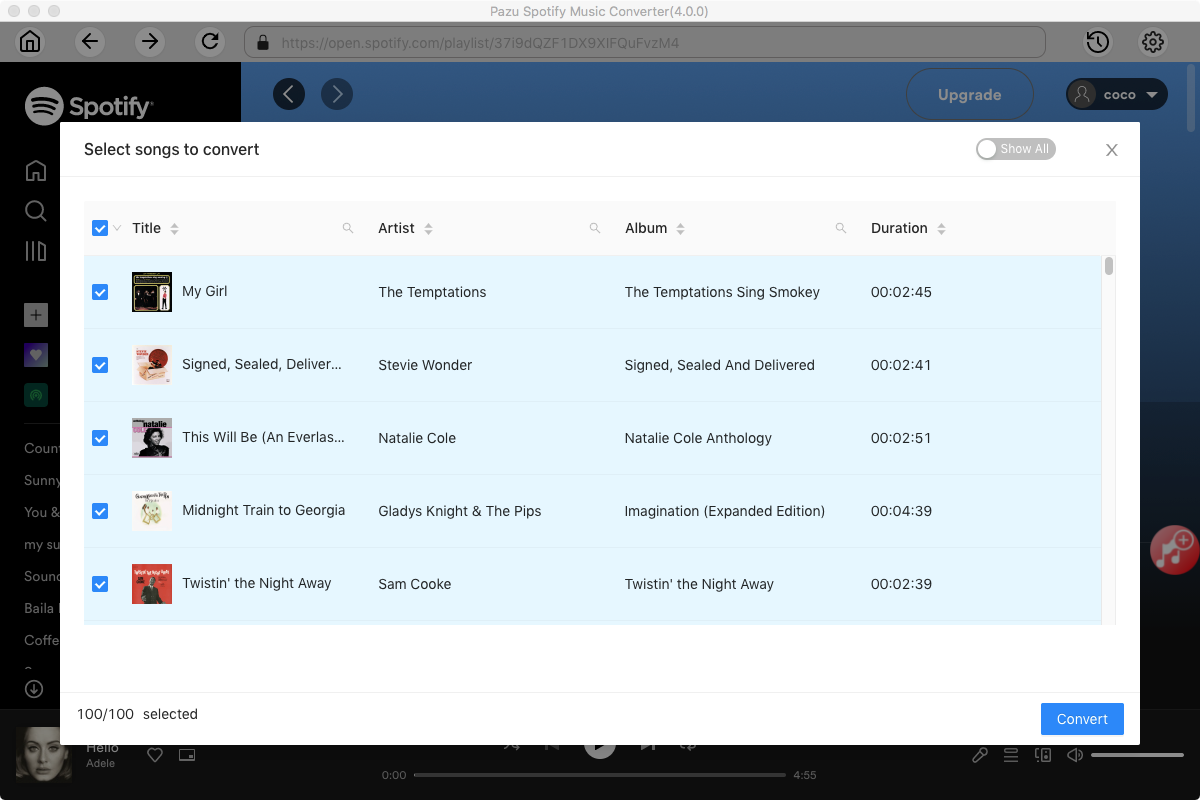
Pazu Spoitfy Converter features built-in Spotify web player for you to browse or search Spotify songs, albums and playlists you want to download directly on the interface. You don’t need to install Spotify app. Click the album or playlist you want to download and then click the red icon to load all songs.
The default output format is M4A. Pazu Spotify Converter also supports MP3, AAC, FLAC, WAV, and AIFF. Click the gear icon on the top right corner to change output format or output quality. You can also change output folder and following:

It's time for the last step. When all the settings have been completed, click Convert to rip Spotify Music to MP3. And within a few minutes, you'll be able to download the ripped Spotify tracks from the route you've chosen.

Once the conversion is done, click the folder icon to find the ripped Spotify songs.

Fildo is an mp3 downloader Android application which allow listen and download mp3 in your Android mobile! Fildo does not host any mp3 files, it’s just an interface to third party mp3 search engines.
Fildo can help you rip music from streaming music platforms. All Spotify users can use it to download music from Spotify and convert them to MP3 on your Android device.
How to rip Spotify to mp3 on Android with Fildo?
Step 1. Download , install and open Fildo on your Android device.
Step 2. Tap “More” tab from the bottom and choose “IMPORT SPOTIFY.”
Step 3. Log in to your Spotify account and the app will load playlists from your Spotify library.
Step 4. After the playlist being loaded, hit the dots on the right of the song to download it as MP3.
Can Spotify music be ripped on iPhones as it can be on Android devices using Fildo on iOS? If you're using an iPhone with iOS 12 installed, the answer is yes. You can now write a script that will perform a variety of tasks on your iPhone, such as ripping Spotify music from all of your iOS devices at once, using specific algorithms. For iOS users, Spotifydl shortcuts are a lifesaver. You can download your favorite music from Spotify by following these simple instructions!
How to rip Spotify to mp3 on iOS with Spotifydl Shortcuts?
Step 1. Install the Spotifydl Shortcuts on your iPhone.
Step 2. Copy the Spotify link from Spotify to Shortcuts to Rip Music.
Step 3. Open the File Folder under Shortcuts.
If you're looking for a tool that can essentially decrypt and then convert your Spotify music to MP3 without losing quality, Pazu Spotify Music Converter is the perfect option for you. Listening to music on numerous devices, such as your Android phone or iPhone, has never been easier. To extract songs from Spotify for free, get the trial version!
Note: The free trial version of Pazu Spotify Converter enables you to convert the first three minutes of each song. You can remove the trial limitation by purchasing the full version.
Buy Now Buy Now
Download and convert any Spotify songs, albums, playlists to MP3/M4A etc.